🚀 Launch Pricing Active — One-time fee. Lifetime access. No monthly subscriptions. Ever. 47:59:59
★ Production-Grade Appointment Infrastructure

Appointments without chaos.
A scheduling system built for reliability.

A battle-tested WordPress appointment engine — one payment, yours forever. No monthly fees. No SaaS lock-in. Just clean, predictable bookings that work every time.

Launch pricing active — ends when the timer hits zero
Get Lifetime Access → ▶ View Live Demo
🔒 Stripe + PayPal secured ⚡ Live in under 5 minutes ✓ 7-day satisfaction guarantee 🌏 Timezone auto-detection 📱 SMS + Email + WhatsApp

SaaS scheduling tools are expensive subscriptions disguised as software.

The old way
$49–$129/month forever — that's $1,548+/year just to take bookings
Bloated dashboards with features you'll never use
Your data lives on someone else's server
Vendor raises prices — you pay or you migrate
Ghost bookings, double-slots, broken notifications
Negative reviews go straight to Google — no filter
Missed appointments with no recovery mechanism
VedNex Schedules
One payment. Lifetime access. $0/month from day two onward
Production-grade infrastructure, zero bloat
Runs on your WordPress — your data, your server, your rules
Price locked at purchase. No surprises. Ever.
Slot locking, ghost-booking prevention, real-time availability
Smart review routing — 4+ stars go public, below 4 stay private
Automated missed-appointment recovery SMS sent instantly

The average appointment SaaS costs $49–$99/month. Over two years, that's:

$2,376
SaaS over 2 years
$249
VedNex, once, forever

That's a $2,127 saving in year one alone — with more control, more features, and zero monthly pressure.

🔥 Save $2,127 in year one — guaranteed

From download to taking bookings in under 5 minutes.

A guided setup wizard walks you through every step. No developer needed. No configuration chaos. Just follow the wizard and paste two shortcodes.

1

Go to Plugins → Add Plugin in your WordPress dashboard

Standard WordPress plugin installation — nothing custom, nothing scary. If you've ever installed a plugin before, this is identical.
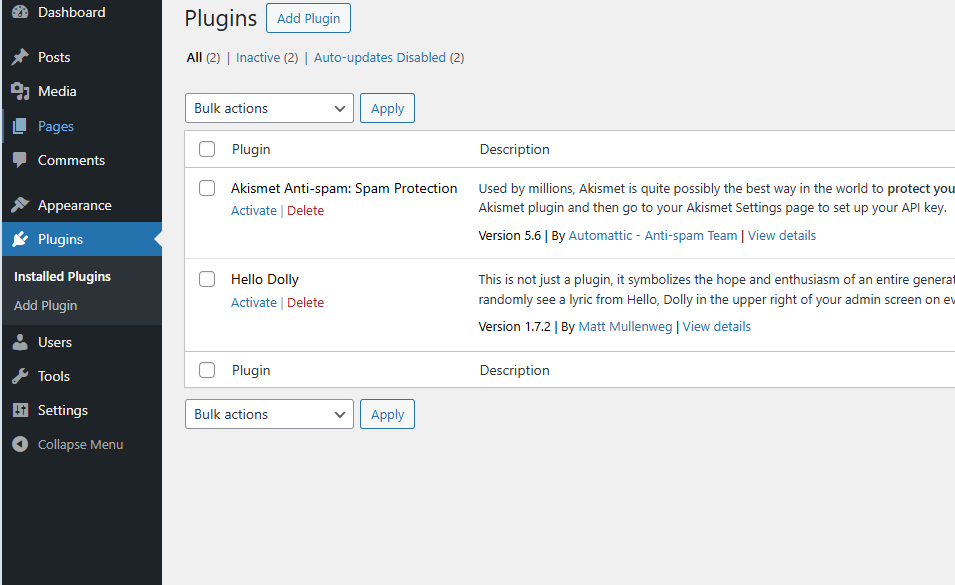
WordPress Plugins page
2

Upload the .zip file you downloaded from your purchase

Click Upload Plugin, select your vednex.zip, hit Install Now. That's it. Three clicks.
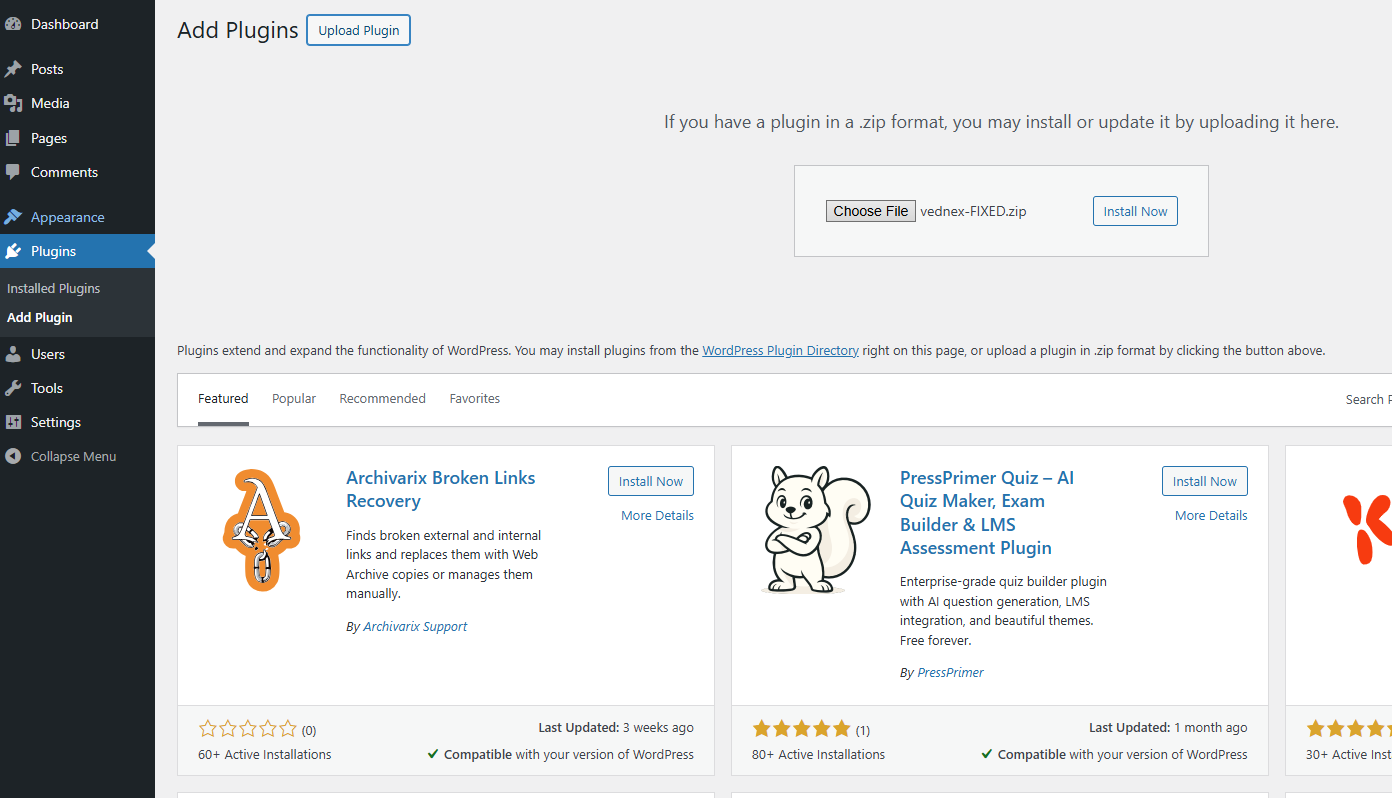
Upload plugin zip file
3

"Plugin installed successfully." Click Activate.

WordPress confirms the install. One click on Activate and VedNex Schedules is running on your site.
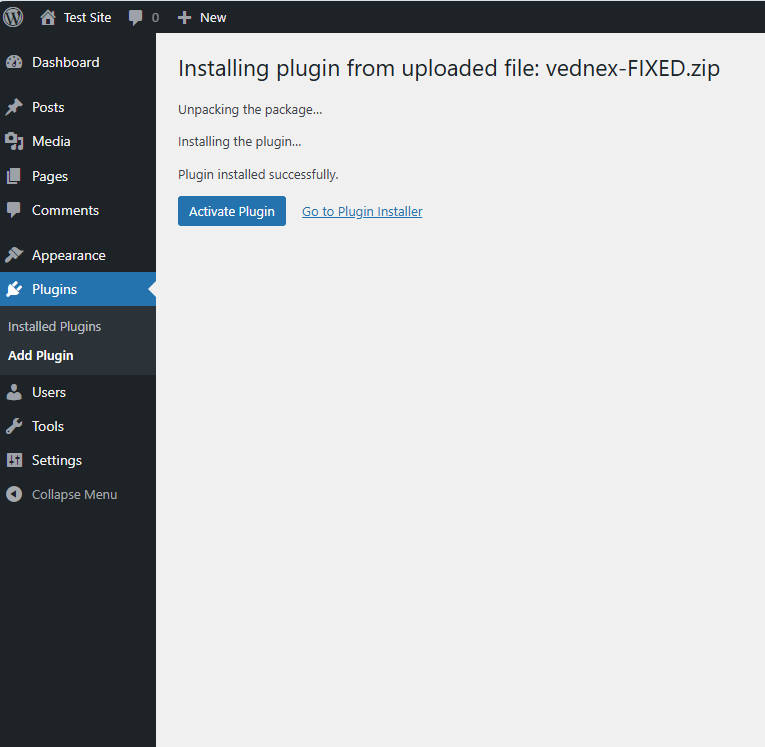
Plugin installed successfully, activate button
4

The setup wizard launches automatically — "under 3 minutes"

No hunting through settings menus. The guided wizard starts immediately and walks you through everything your business needs: services, team, notifications, and your booking link.
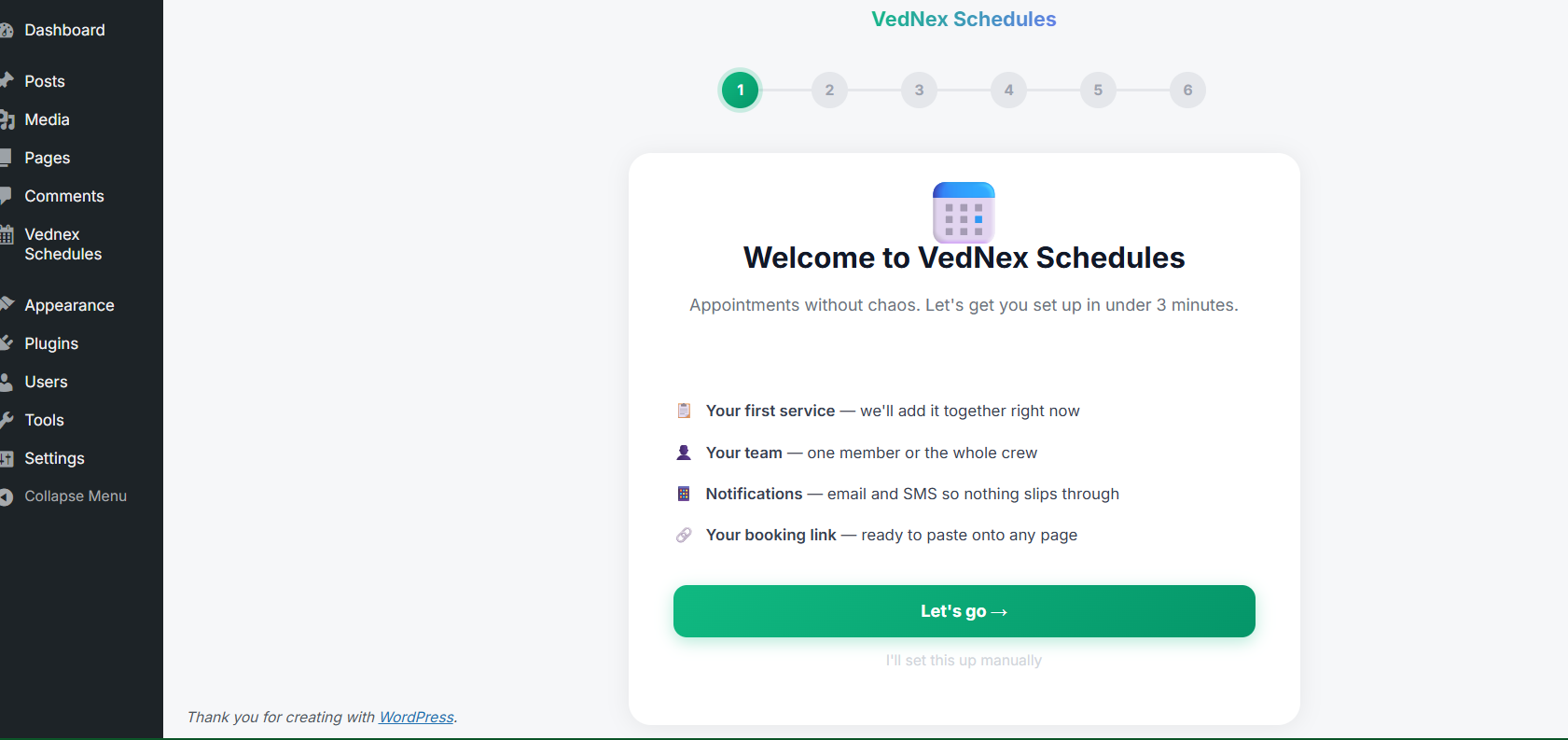
VedNex welcome wizard
5

Enter your business name, timezone, currency — 30 seconds

Timezone auto-detects. Currency auto-selects. Your admin notification email is set. The system already knows where you are.
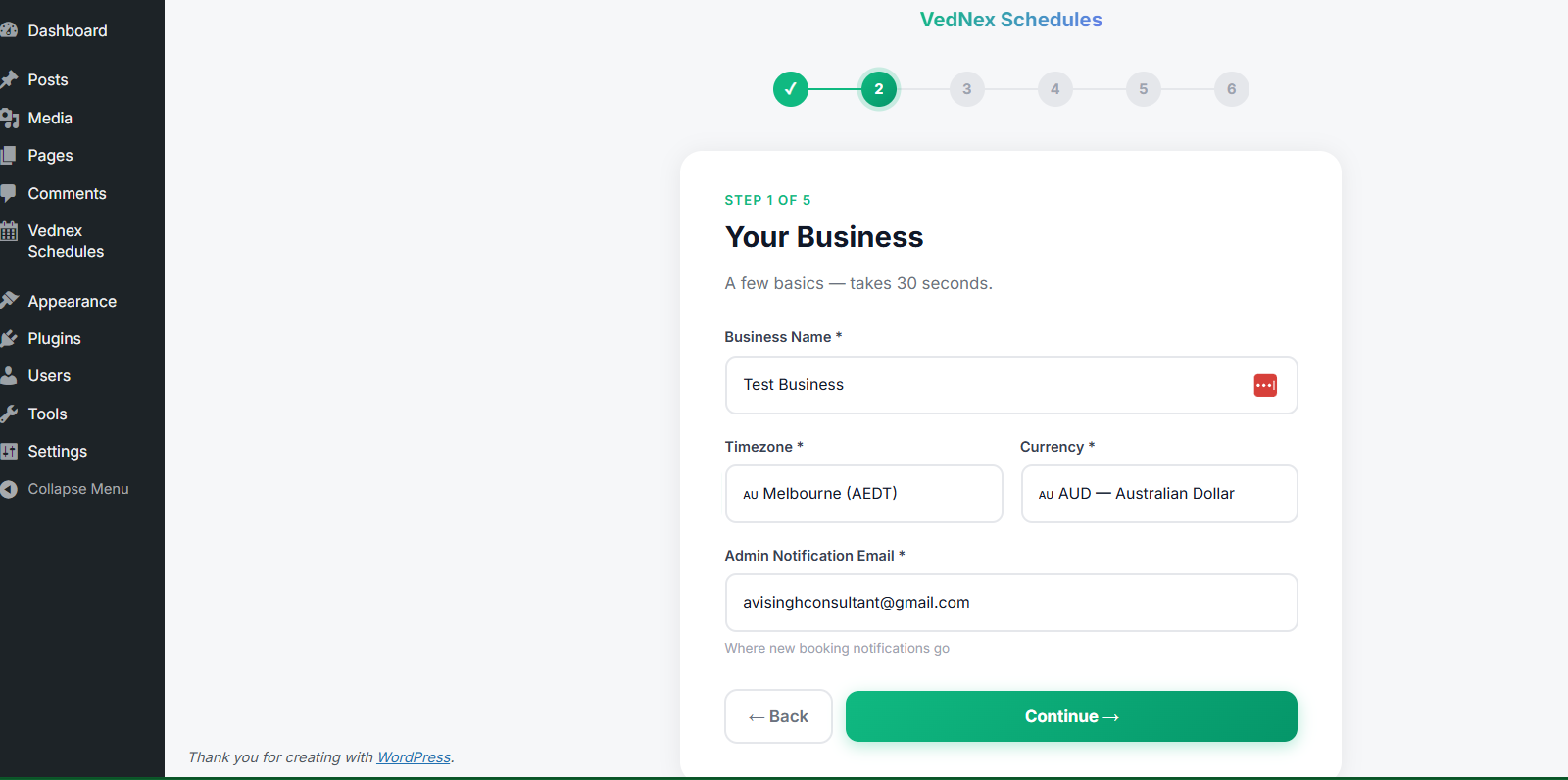
Business setup step
6

Add your first service — name, duration, price

Three fields. Service name, duration in minutes, and price. The placeholder "Deep Tissue Massage, 60 min, $120" shows you exactly what to type. Add more services after setup from the full admin panel.
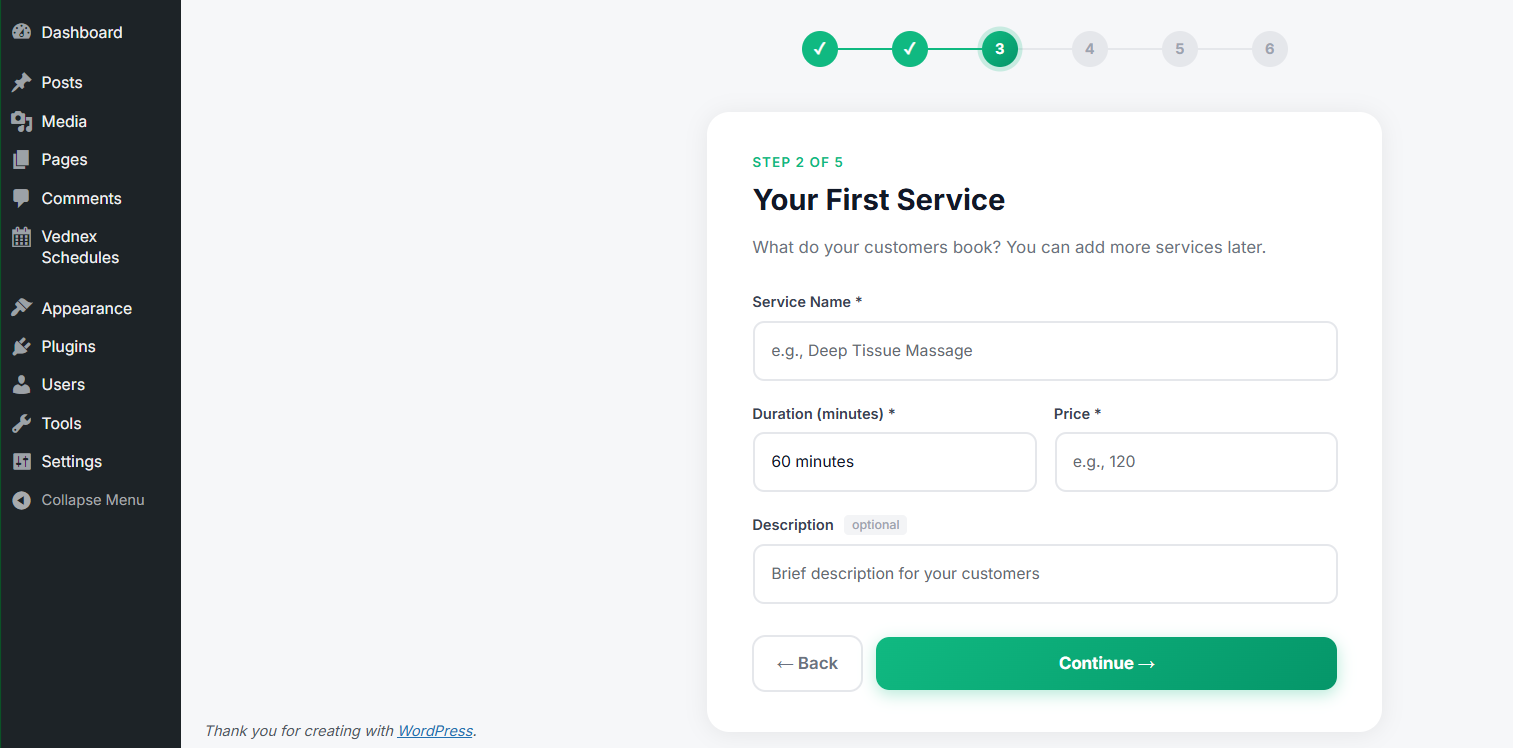
First service setup
7

Add your team — or tick "It's just me" and skip

Solo operator? One checkbox and you're done. Running a team? Add name, role, mobile (for SMS alerts), and email. The system handles multi-provider booking automatically.
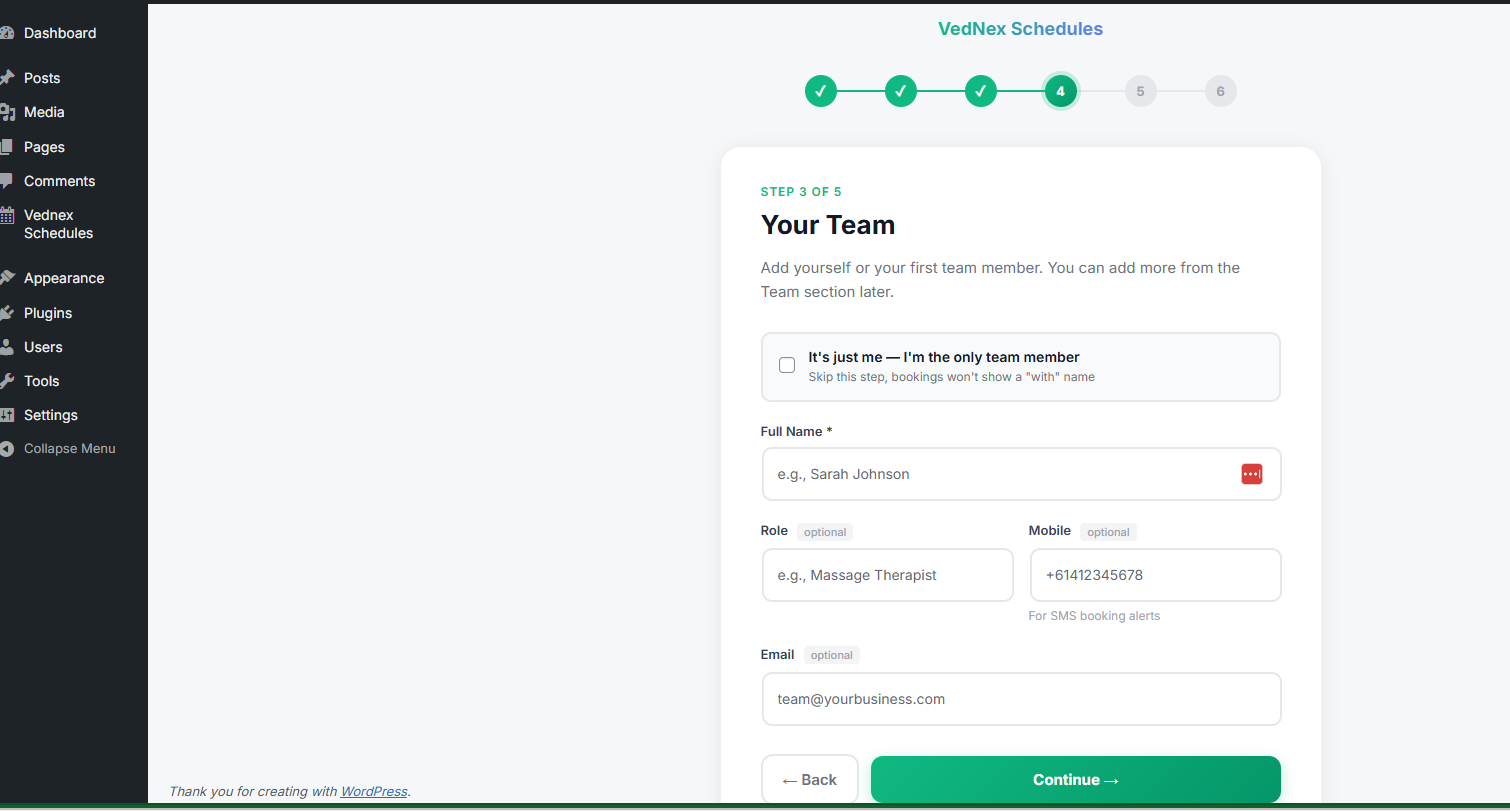
Team member setup
8

Configure notifications — email pre-ticked, SMS optional

Confirmation emails and 24-hour reminders are enabled by default. "Multiple reminders increase attendance" — the system tells you this because it's true. SMS via Twilio can be set up now or later.
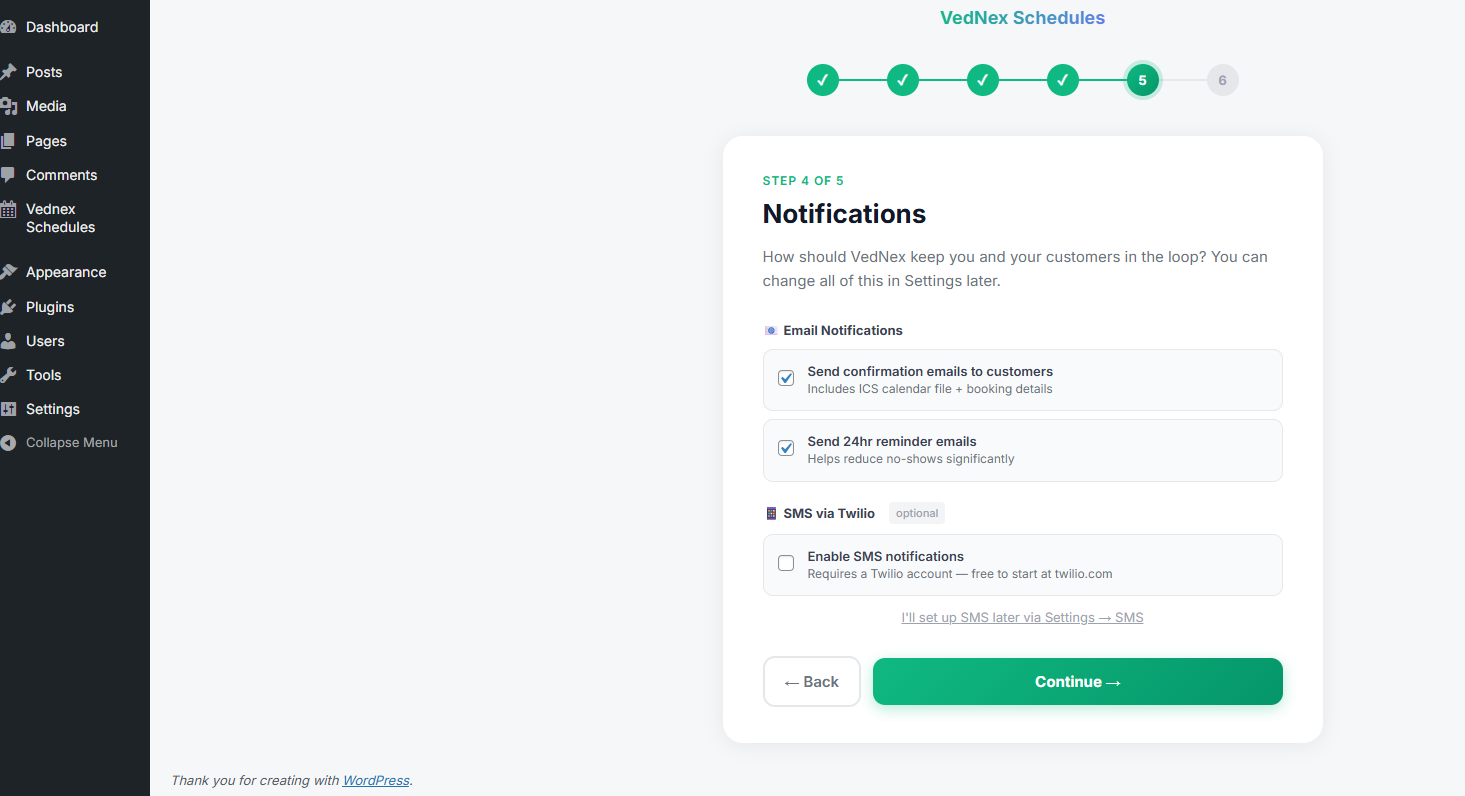
Notifications setup
9

"You're ready to take bookings!" — copy your two shortcodes

The wizard ends with both shortcodes ready to copy. Paste [vednex_schedules] onto any page for the booking form. [vednex_customer_portal] for the self-service customer portal. Done.
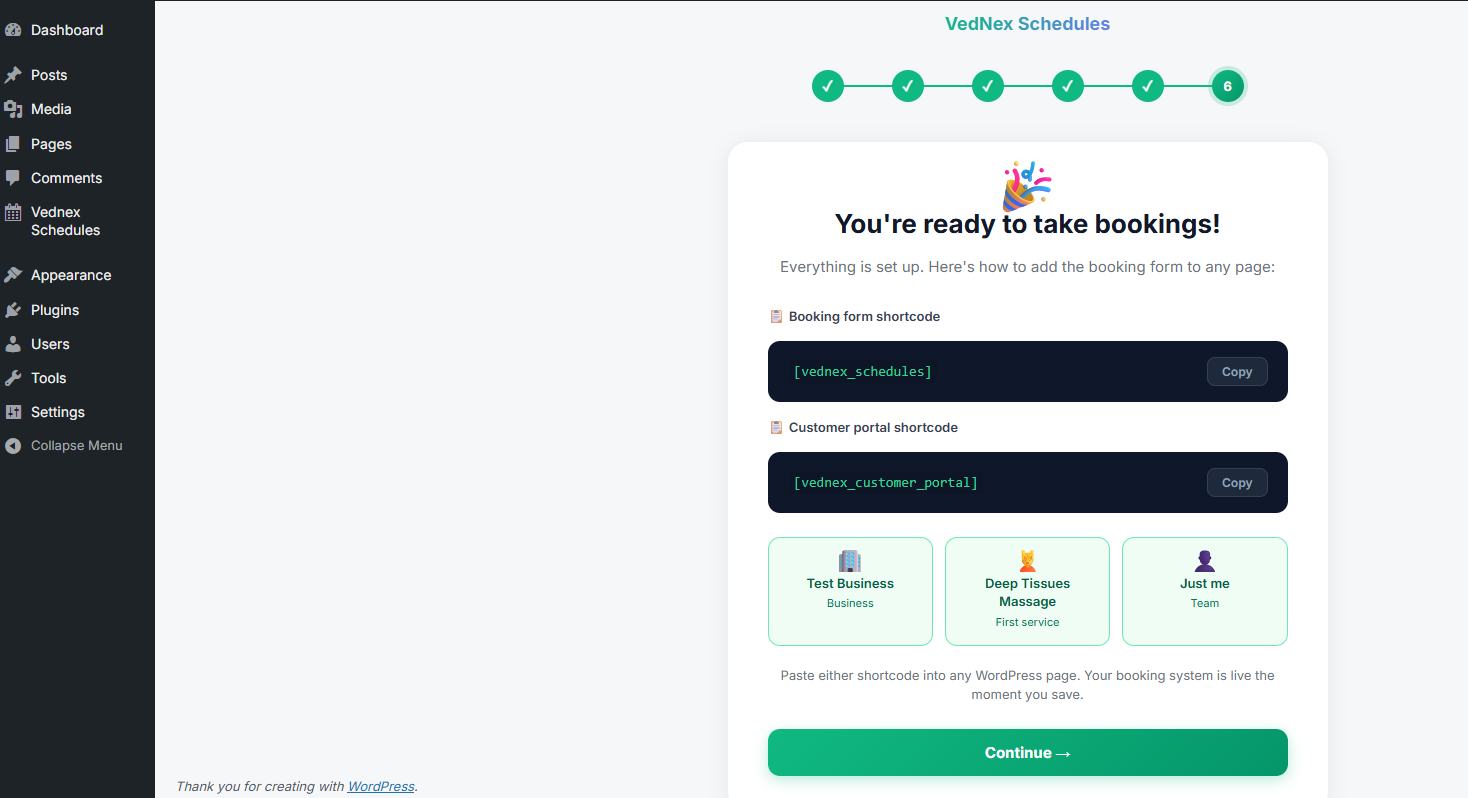
Shortcodes ready screen
10

Enter your licence key → Licence Active ✅

Paste your licence key from your purchase email. One click on Activate. Green "Licence Active" confirmation. Full system unlocked.
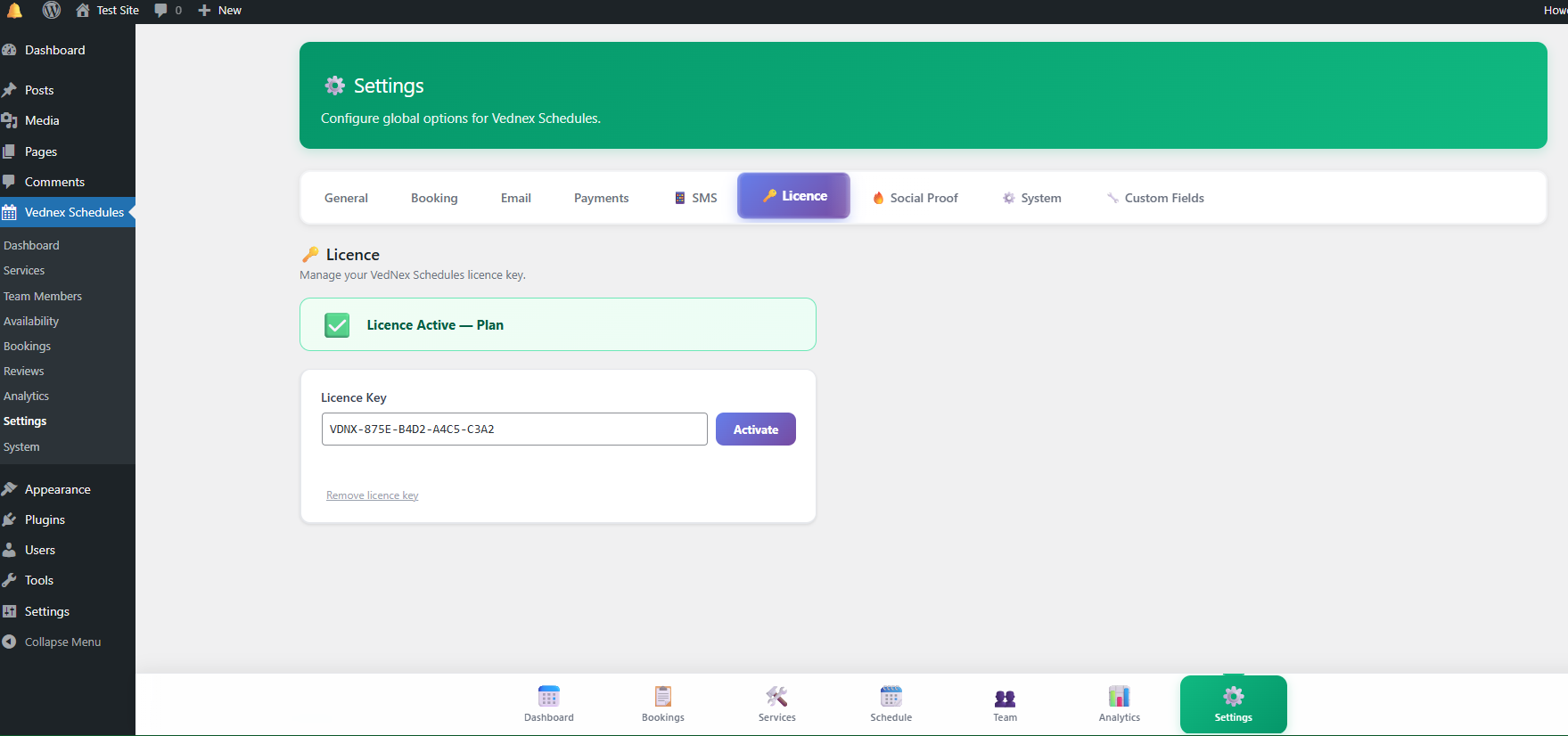
Licence key active
🎉

Your booking system is live.

Ten steps. Under 5 minutes. No developer. No config file. No support ticket. Paste two shortcodes onto any WordPress page and you're taking appointments.
Enterprise-grade booking infrastructure — in two shortcodes.

Every feature your business needs to run appointments professionally. Not a stripped-down lite version — the full production system, included.

📅

Production Booking Engine

Multi-step booking flow — service → team → time → details → payment. Built to convert.

  • Slot locking with 10-min countdown
  • Ghost booking auto-expiry (cron-driven)
  • Real-time availability
  • Drag-to-reschedule with undo
  • Timezone auto-detection
  • Social proof ticker ("Sarah just booked · 2 min ago")
  • Phone intelligence — country + mobile detection
💳

Flexible Payments

Every payment path lands cleanly in the customer portal — no dead-end confirmation pages.

  • Stripe Checkout Sessions + webhook confirmation
  • PayPal integration
  • Offline / Pay Later option
  • Full Payment OR Deposit Only mode
  • Receipt download from portal
🔗

Magic Link Customer Portal

Your customers manage everything themselves — no passwords, no friction, no support load.

  • No login required — magic link access
  • 7-day link validity, 24-hr refresh on request
  • Add to Google, Apple, or Outlook calendar
  • WhatsApp confirmation — one tap
  • Inline reschedule, cancel, or book again
  • Receipt download available immediately
📱

SMS Engine — 9 Message Types

Customers, team members, and operators all get the right message at the right moment.

  • Customer: confirmation, reminders, cancellation
  • Team: new booking, 30-min reminder, morning brief
  • Operator morning briefing at 7:30am
  • Missed appointment recovery sequence
  • Smart language: "today / tomorrow / on [date]"
✉️

Email Engine + ICS Invites

Built-in SMTP. Multiple reminder timings. Calendar invites attached automatically.

  • SMTP recommended — not WP default (more reliable)
  • 24hr and 2hr reminder emails pre-configured
  • ICS calendar invites attached to every confirmation
  • Reschedule + cancel notices
  • Review request emails post-appointment
📊

Analytics Dashboard

Business intelligence built in — not bolted on. Know your numbers without a third-party tool.

  • Total bookings, revenue, unique customers
  • Avg booking value + completion rate
  • Revenue chart — last 8 weeks
  • Bookings by day of week
  • Top services + team utilisation
  • This week / this month / this year views
🗓️

Admin Bookings — List + Calendar

Two views of your bookings. Both are clean, fast, and built for daily use.

  • FullCalendar week/month/day view
  • Colour-coded by status (Confirmed/Paid/Pending/Cancelled)
  • Filter by team member
  • New Booking + Block Time buttons
  • Card list view with Edit / Contact actions
  • Export CSV — your data, portable

That's the whole system. Two shortcodes.

[vednex_schedules] [vednex_customer_portal] Paste onto any WordPress page. Your full booking infrastructure is live.

The complete booking experience — from browse to booked.

This is what your customers actually see. Clean, guided, and confidence-building at every step.

1
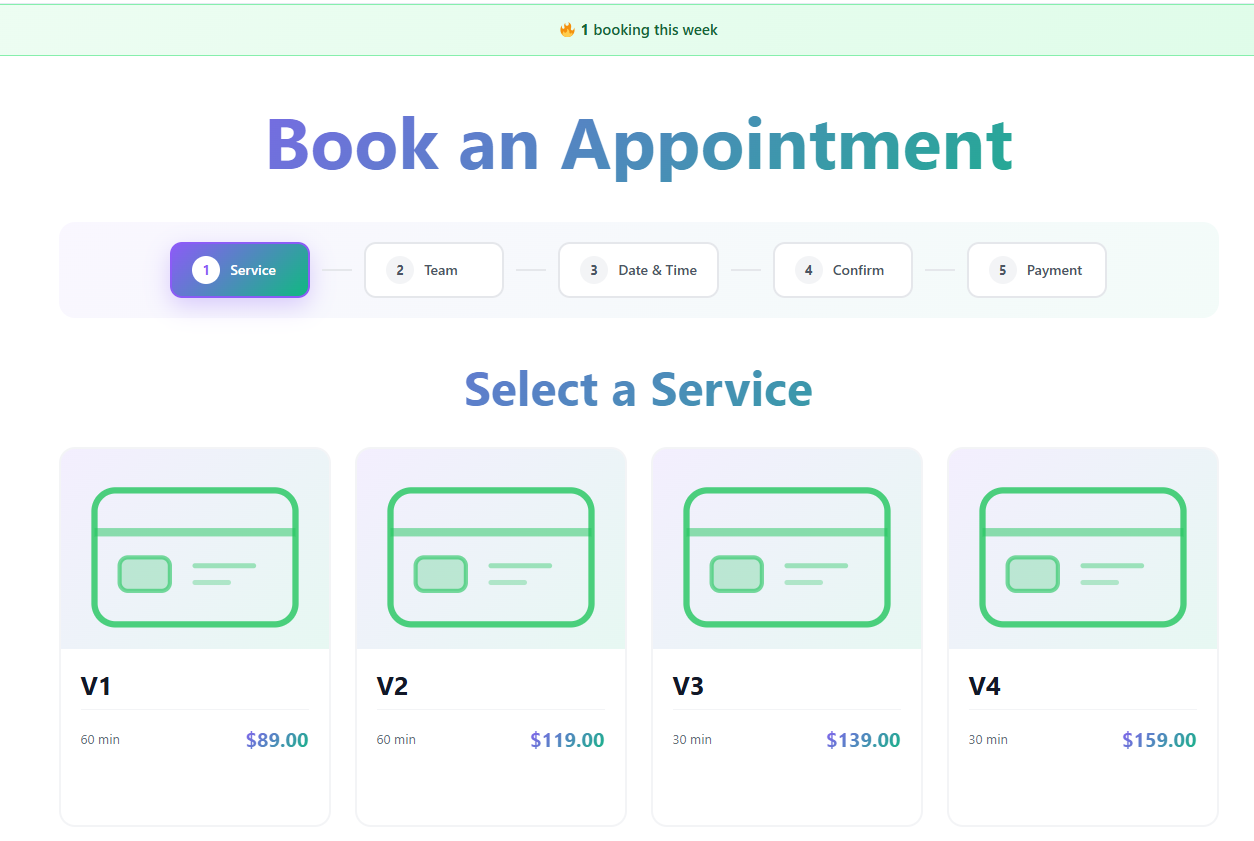
Step One — Service Selection

They pick a service. Instantly see what it costs.

No guesswork. No "contact us for pricing." Services are displayed as clean cards with duration and price upfront — so customers self-qualify before they even book.

Social proof ticker fires at the top — "🔥 1 booking this week" builds urgency naturally
5-step progress bar keeps customers oriented — no dead ends, no confusion
All service variants shown with price — no back-and-forth emails
Booking step 1 — service selection
Step 1 of 5 — Service Selection
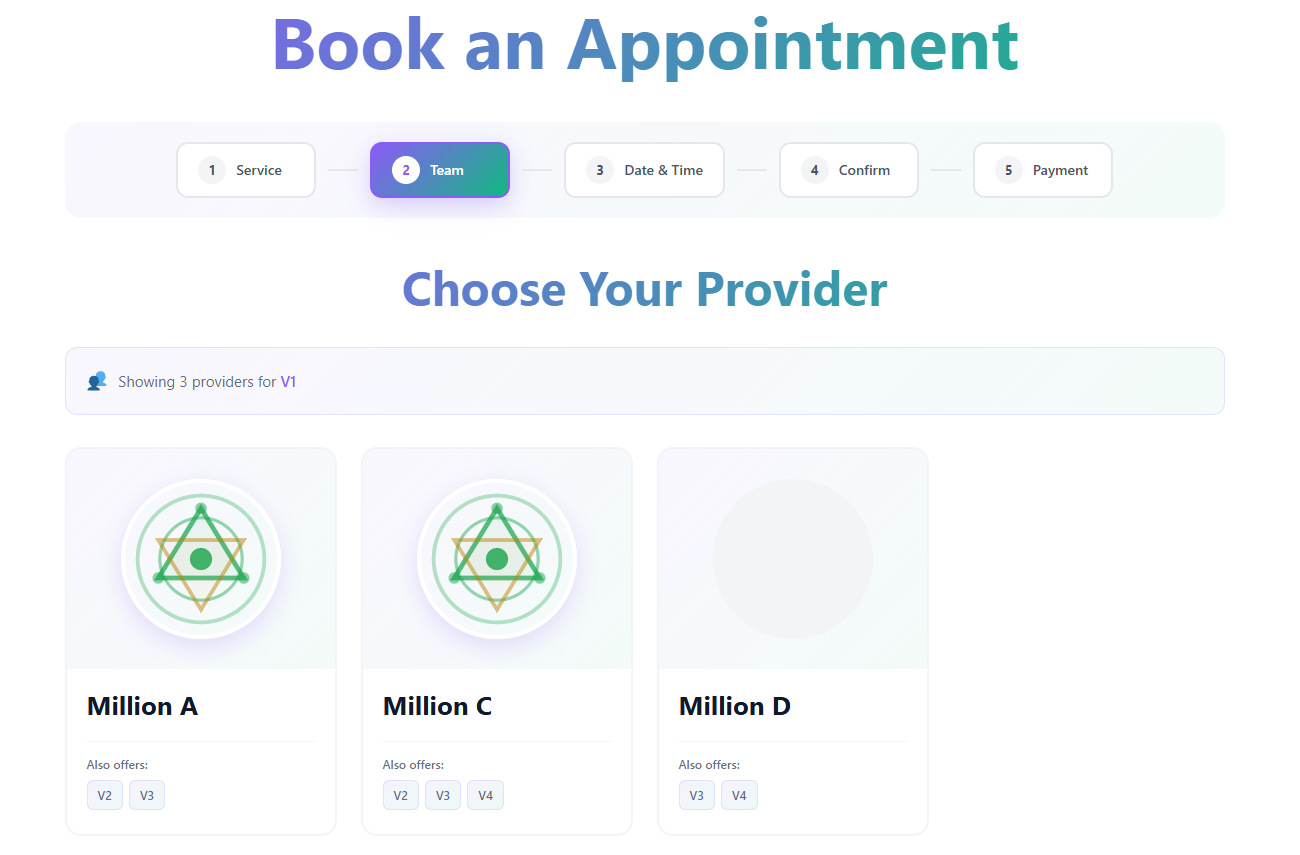
2
Step Two — Team Member

They choose who they work with.

Customer loyalty starts here. Returning clients can rebook with their preferred provider — and every team member's additional services are shown for organic upsell.

Provider profiles show other services offered — organic cross-sell
Filtered automatically to only show eligible providers
Photo-first cards build trust before the appointment begins
Booking step 2 — team selection
Step 2 of 5 — Choose Your Provider
3
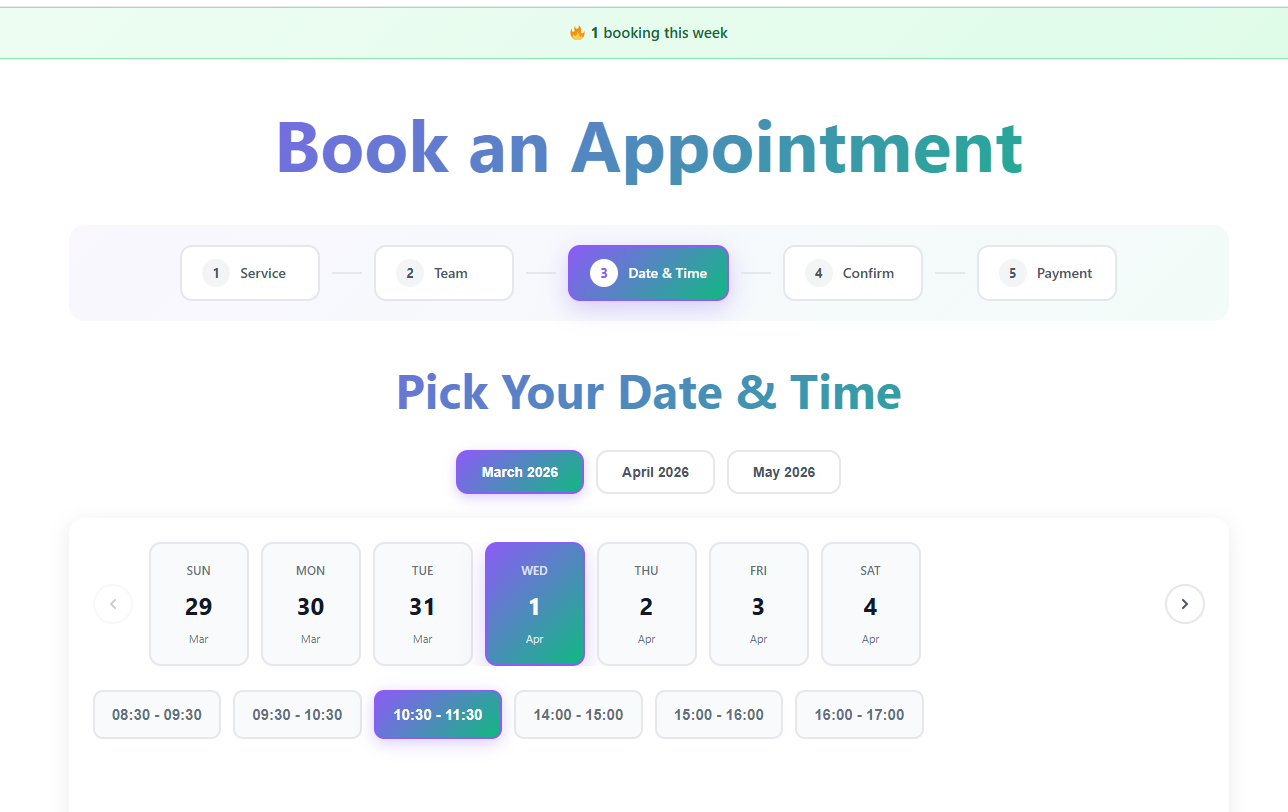
Step Three — Date & Time

Real-time availability. Timezone-aware. Frictionless.

The calendar shows only genuinely available slots. Timezone is auto-detected so a client in Sydney booking a Melbourne business never gets the time wrong.

Month tabs for fast browsing — no tiny calendar widget
Time slots as clear pill buttons — tap to select
Slot locking begins on selection — 10-min hold with countdown
Booking step 3 — date and time
Step 3 of 5 — Pick Your Date & Time
4
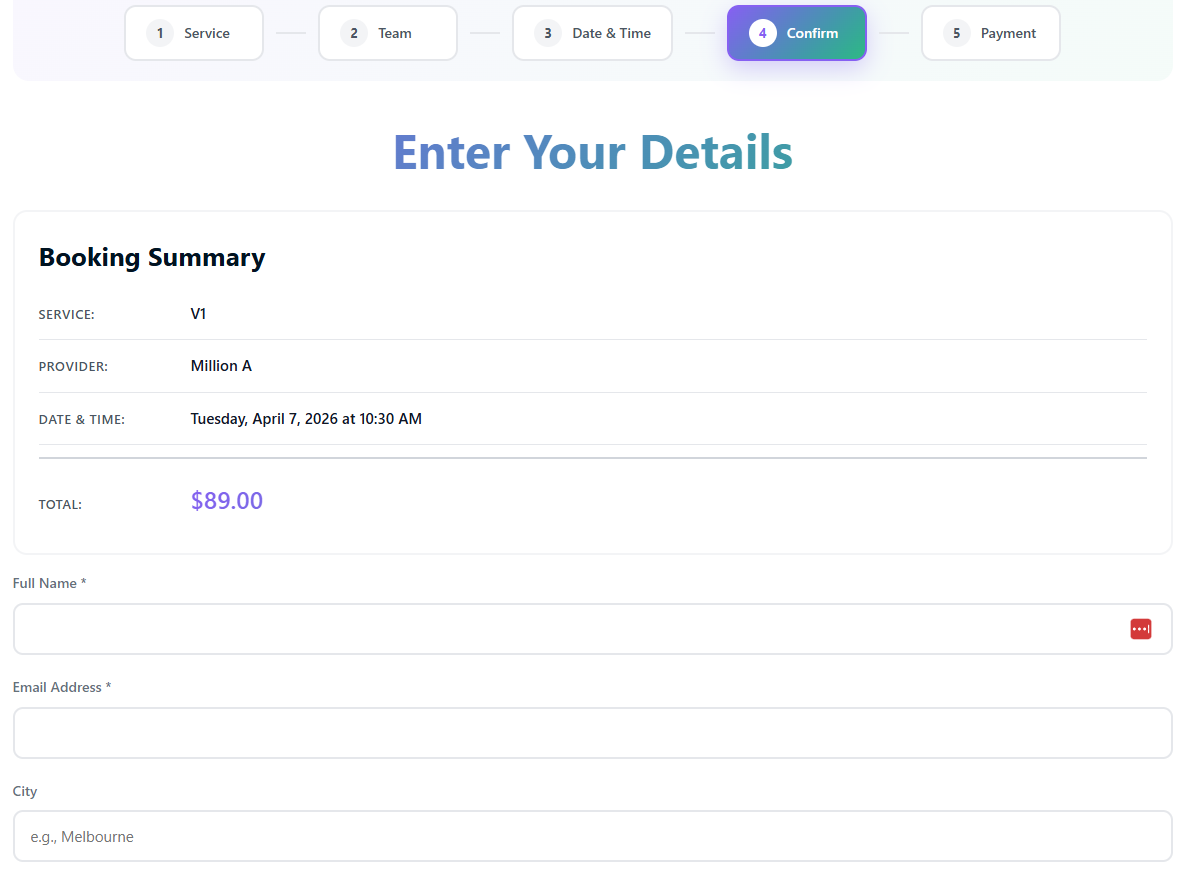
Step Four — Details & Confirm

Full booking summary. Customer details. Zero surprises.

A clean summary confirms every detail before payment. The city field feeds your social proof ticker — so real location data powers "Sarah from Melbourne just booked."

Full booking summary visible — builds confidence before card details
City field feeds the social proof ticker for other visitors
Custom fields builder — add any data your business needs
Booking step 4 — confirm details
Step 4 of 5 — Enter Your Details
5
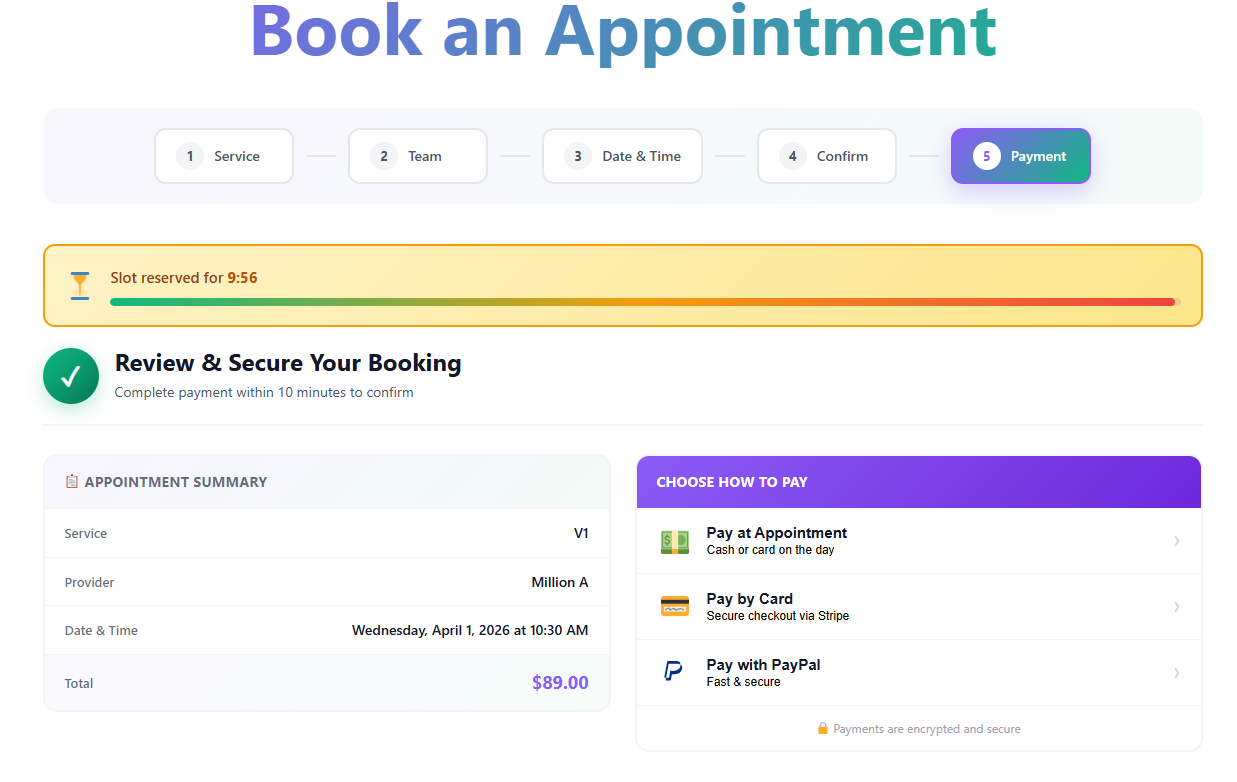
Step Five — Payment

A live countdown that converts browsers into buyers.

The slot reservation countdown is one of the highest-converting elements in the system. The customer knows their spot is held — but only if they complete payment now.

Live countdown — "Slot reserved for 9:56" with progress bar
Three payment paths: Stripe, PayPal, or Pay at Appointment
Every path routes to the same clean customer portal
Booking step 5 — payment with countdown
Step 5 of 5 — Secure Your Booking
After Booking — Customer Portal

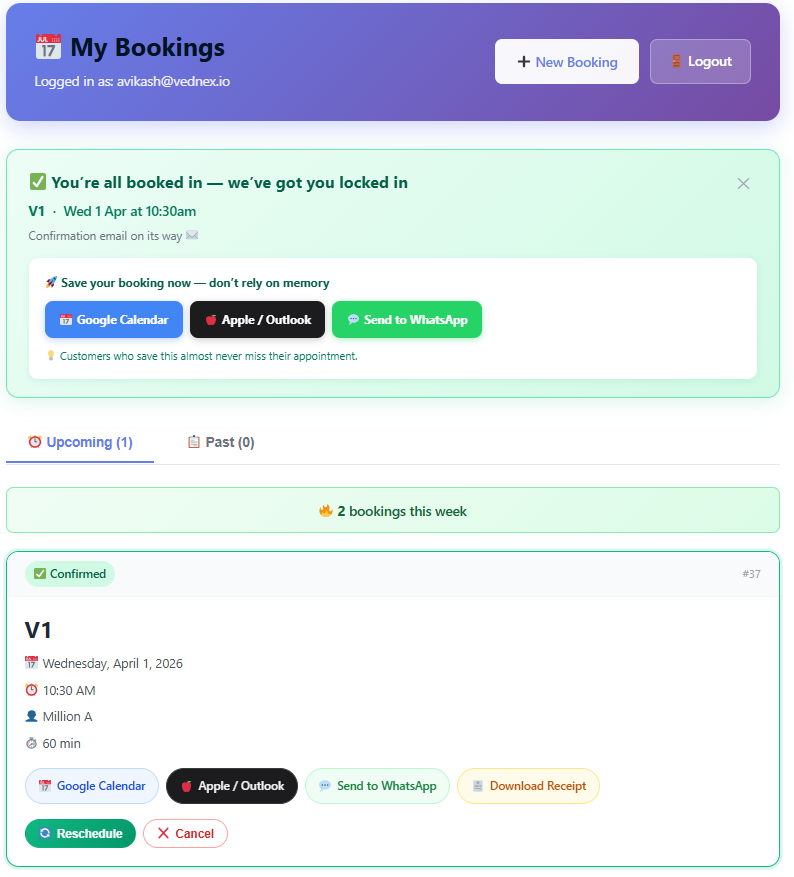
Booked. Confirmed. In their calendar. Zero follow-up required.

The moment payment completes, customers land in their personal portal. No account setup. Everything they need is right there — and it's there for every future booking too.

Instant confirmation with one-tap calendar add (Google, Apple, Outlook)
WhatsApp confirmation — send the booking to their phone in one tap
Reschedule, cancel, or book again — all self-serve. Zero admin load.
Receipt download available immediately
Customer portal — bookings management
Post-Booking — Magic Link Customer Portal

The system talks to everyone — automatically.

Every booking triggers the right message to the right person at the right moment. No manual follow-up. No missed reminders. No chasing no-shows.

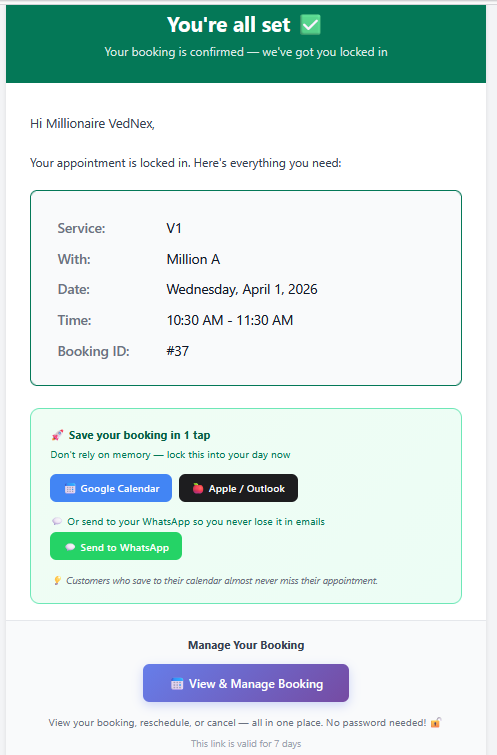
Booking confirmation email
Email

Confirmation email with ICS calendar invite

Sent instantly on booking. Includes full appointment details, calendar buttons (Google + Apple/Outlook), WhatsApp link, and a magic link to manage the booking — valid for 7 days.

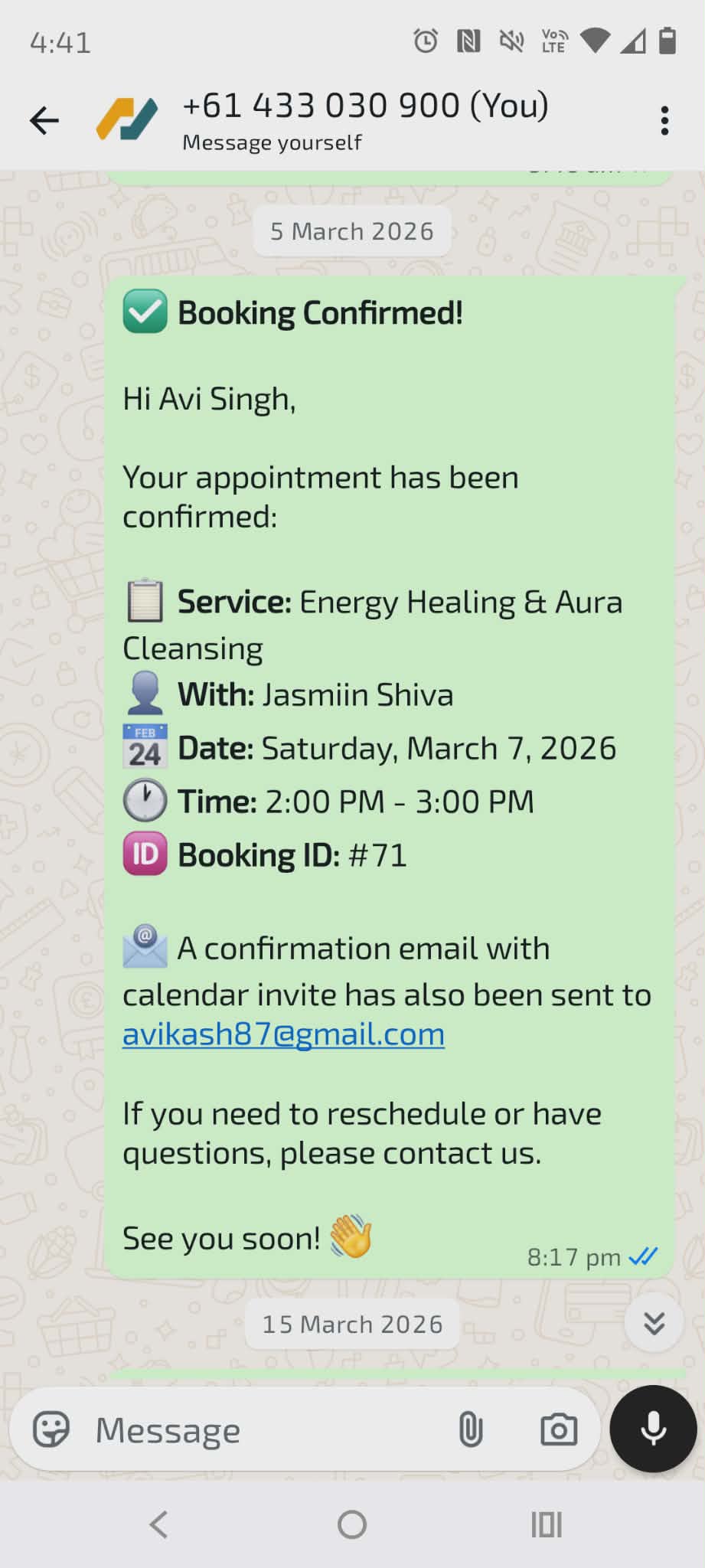
WhatsApp booking confirmation
WhatsApp

Full booking confirmation via WhatsApp

Service, provider, date, time, and booking ID — all in a WhatsApp message. Customers who save appointments to WhatsApp almost never miss. A confirmation email is also sent simultaneously.

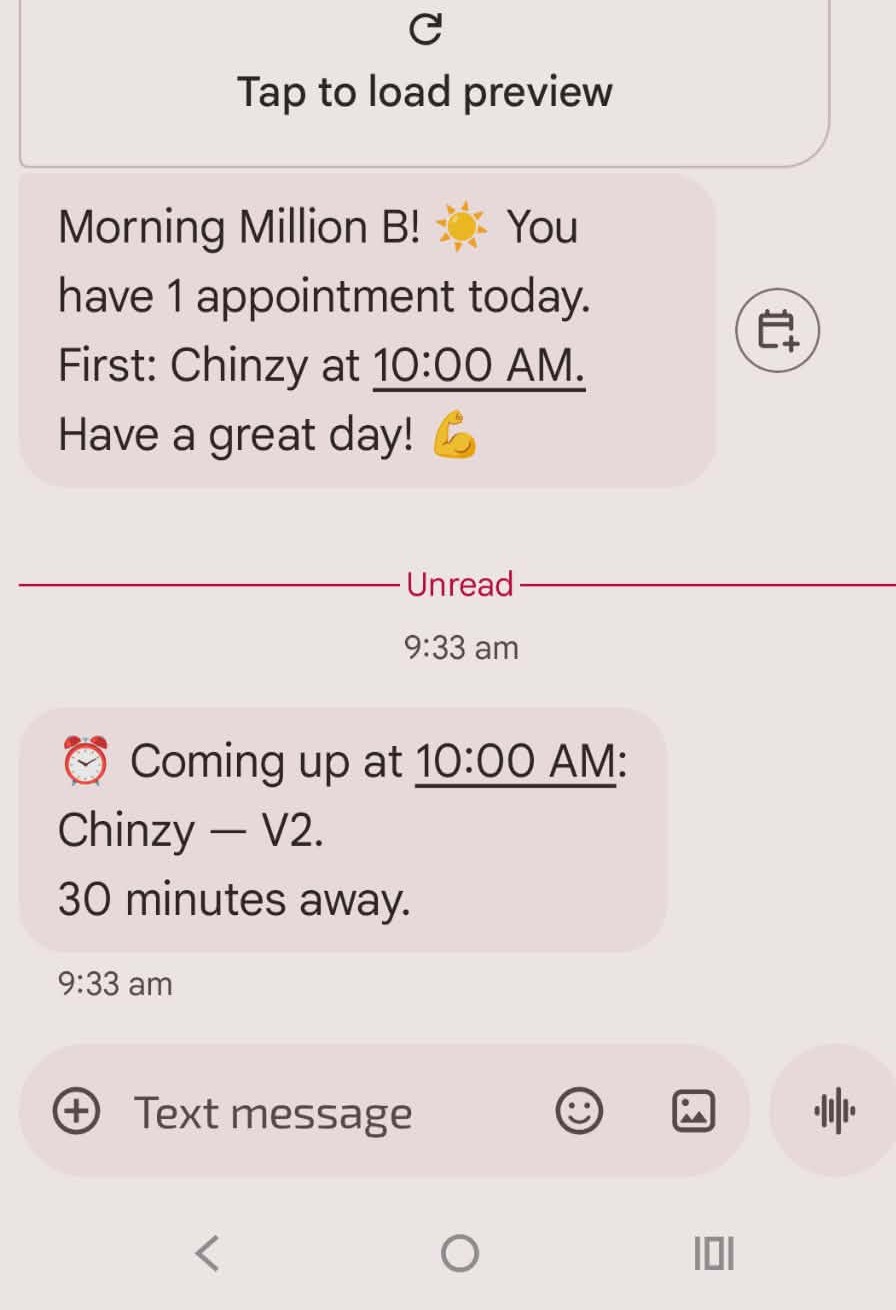
Morning briefing and 30-min reminder SMS
SMS — Team

Morning briefing + 30-minute pre-appointment alert

Your team wakes up to a day summary SMS at 7:30am. Then, 30 minutes before each appointment, they get a targeted alert. No scrambling. No surprises.

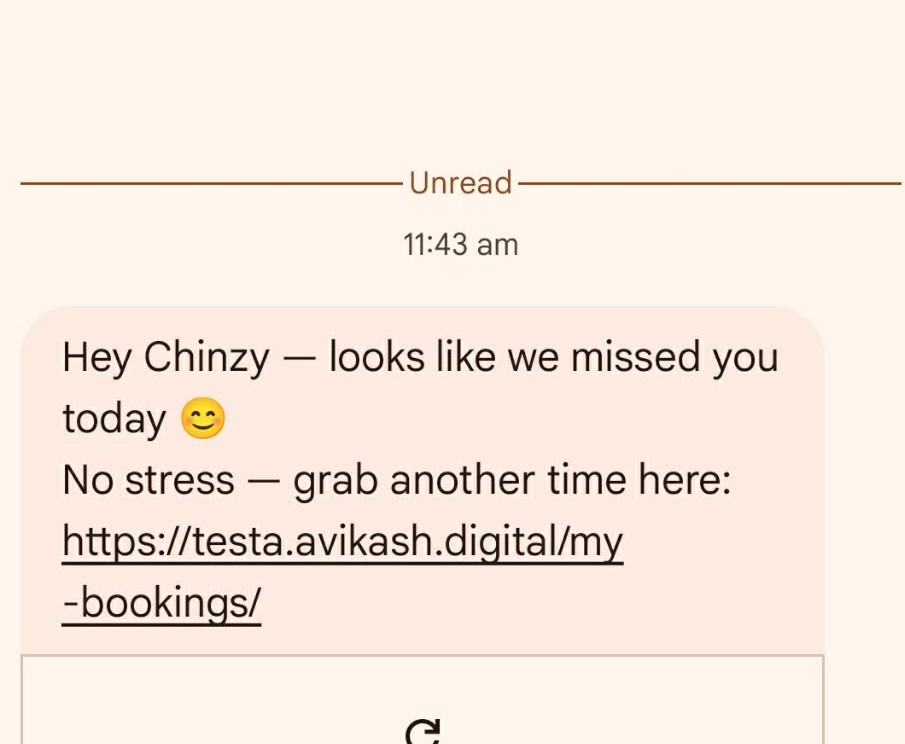
Missed booking recovery SMS
SMS — Recovery

Missed appointment recovery — sent automatically

"Hey Chinzy — looks like we missed you today 😊 No stress — grab another time here:" — gentle, on-brand, and sends a direct rebooking link. Recovers appointments you'd otherwise lose forever.

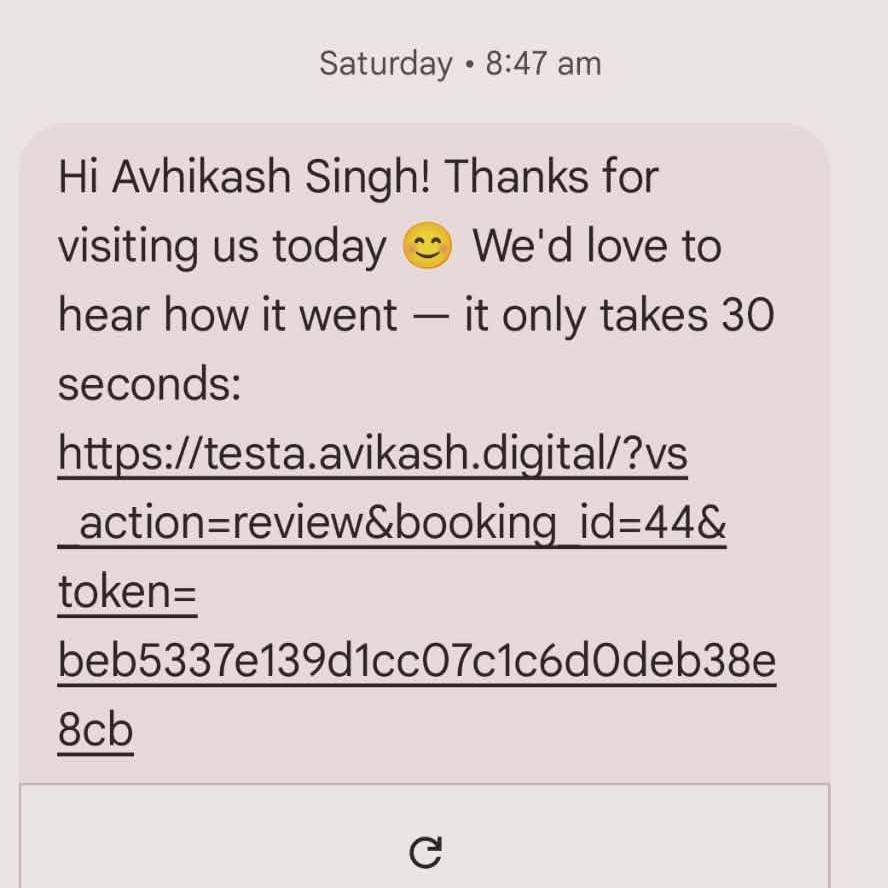
Review request SMS
SMS — Reviews

Post-appointment review request — "30 seconds"

When a booking is marked complete, a personalised review SMS fires automatically. "It only takes 30 seconds" — proven copy that gets responses. 4+ stars go to Google. Below 4 stay private.

Your dashboard. Feels like an app. Works like infrastructure.

Built for operators who need to glance and know — not hunt through menus. Every screen is designed for daily use at speed.

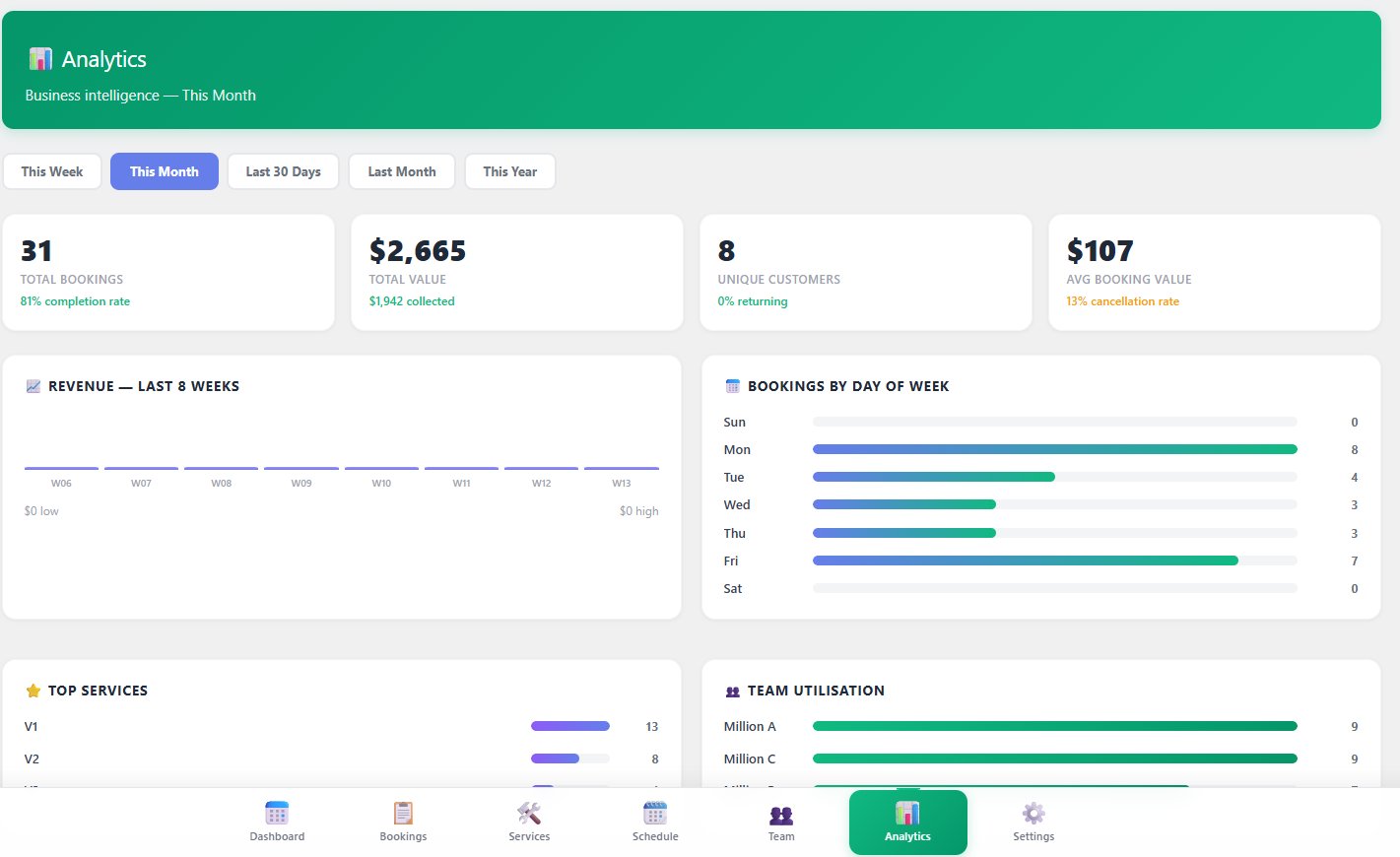
Analytics dashboard — 31 bookings, $2,665 revenue
Analytics

Business intelligence — built in, not bolted on

31 bookings. $2,665 total value. $1,942 collected. 81% completion rate. $107 average booking value. Revenue chart, bookings by day of week, top services, team utilisation — all in one screen. This is the kind of dashboard you'd pay $200/month for as a standalone SaaS tool.

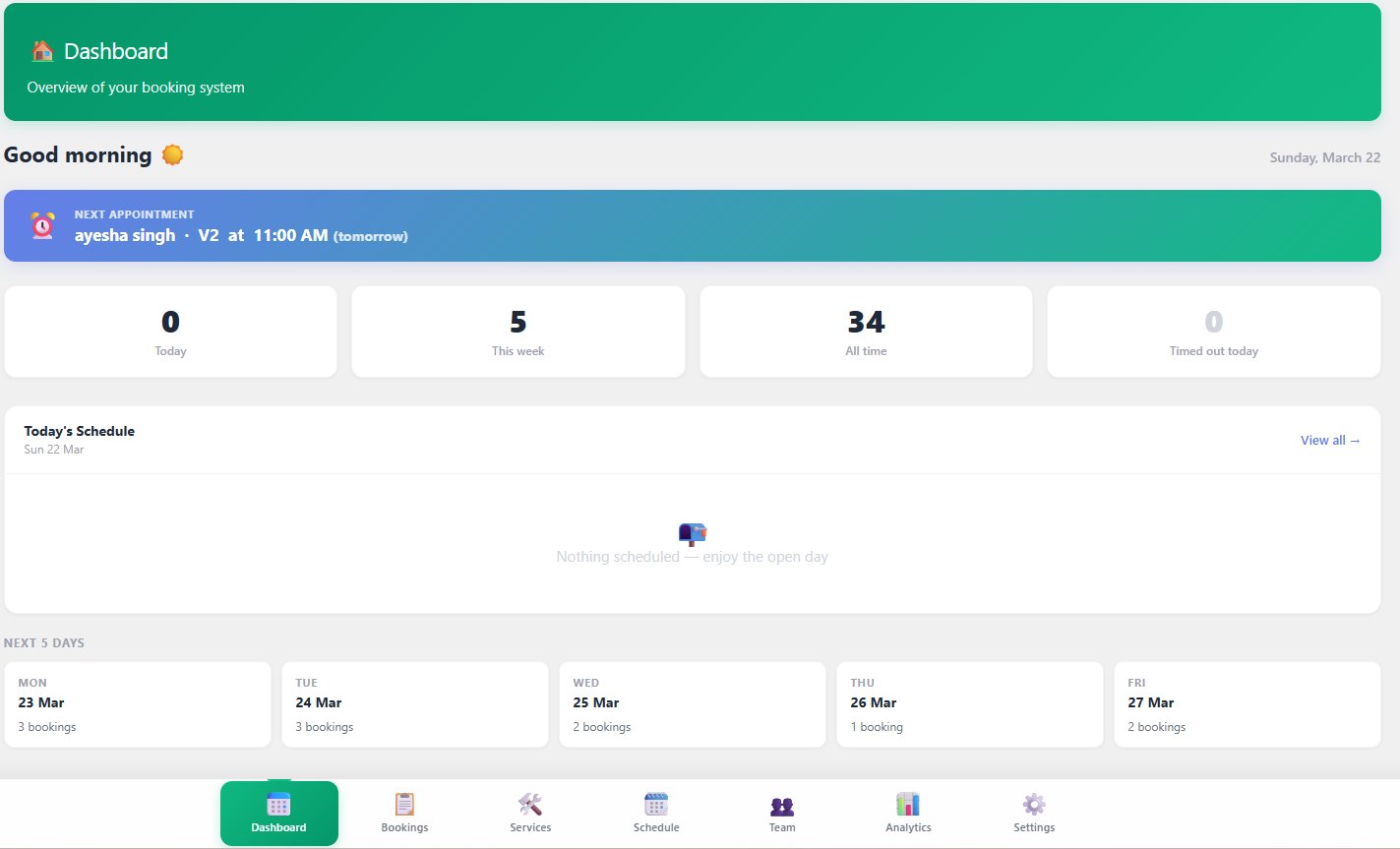
Admin dashboard — next 5 days view
Dashboard

Your day at a glance — before your first coffee

Next appointment pinned at the top. Today's schedule. Next 5 days showing booking counts per day. Everything you need to start the day, in one screen, in seconds.

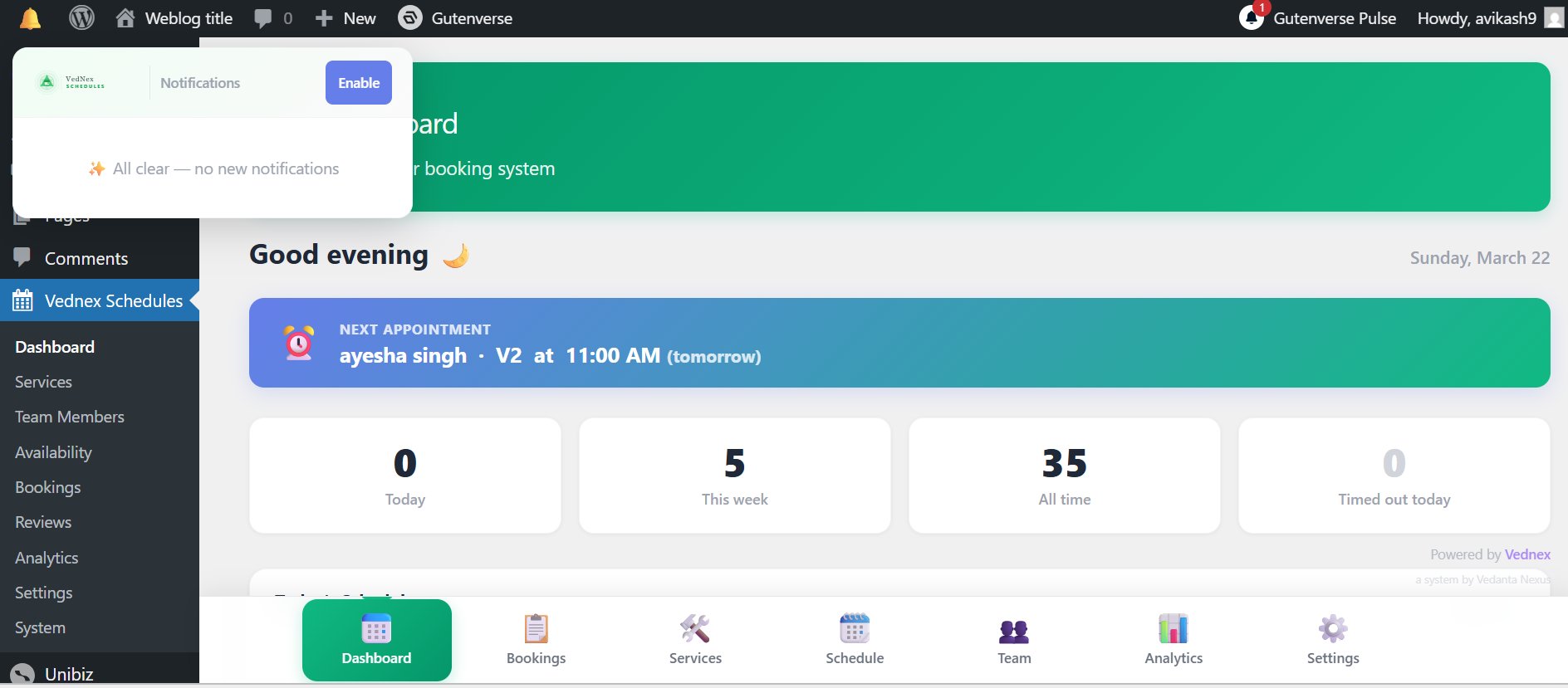
Push notification bell
Notifications

Push notification bell — new bookings, instantly

New booking comes in? The bell badge updates in real time. Every notification is timestamped and actionable — no digging through emails to find what just happened.

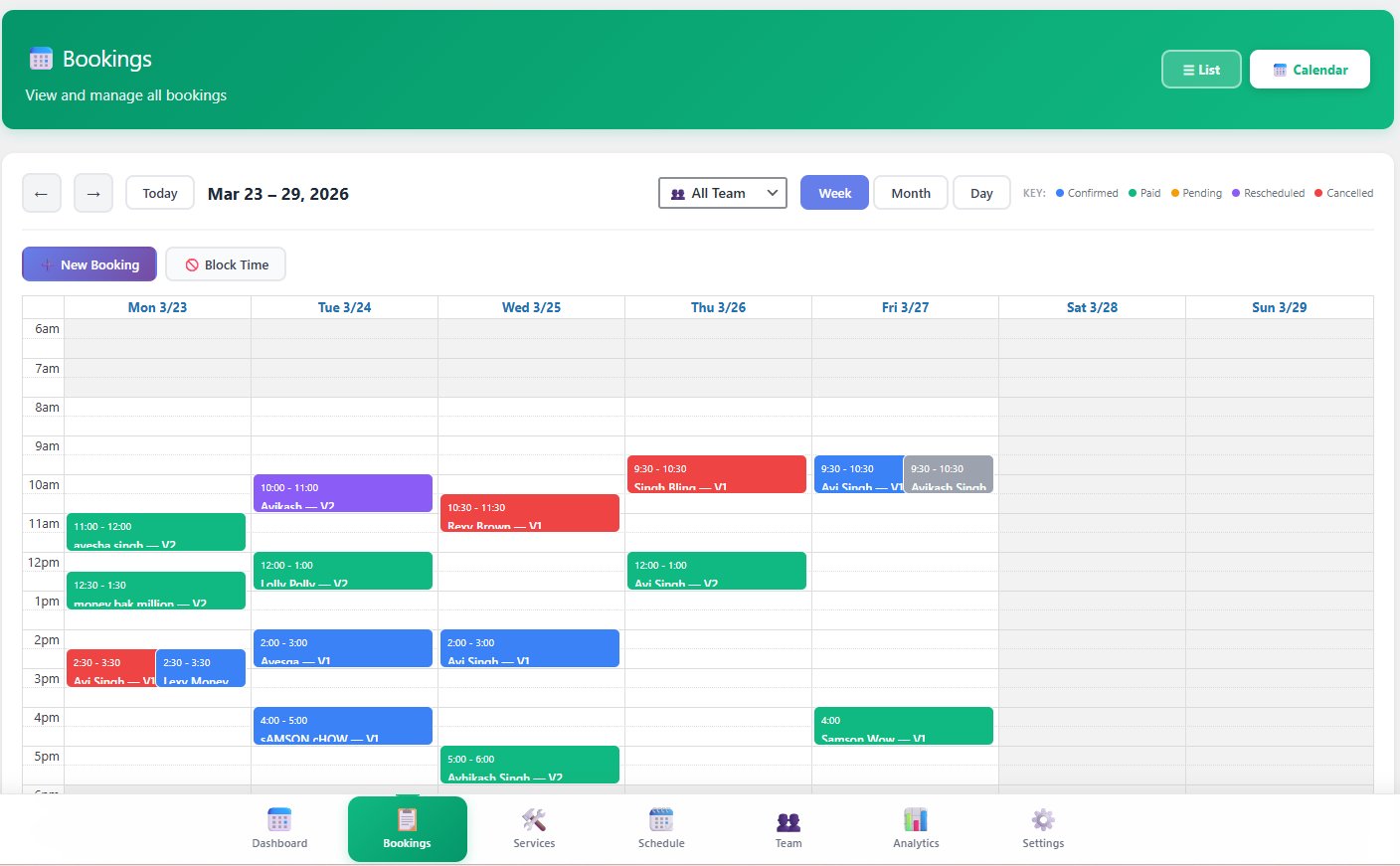
Bookings calendar view — week, colour-coded
Calendar View

Full week calendar — colour-coded, multi-provider

Confirmed (blue), Paid (green), Pending (yellow), Rescheduled (purple), Cancelled (red). Filter by team member. Switch between Week, Month, and Day views. New Booking and Block Time available from this screen. Looks and feels like Google Calendar — on your own WordPress.

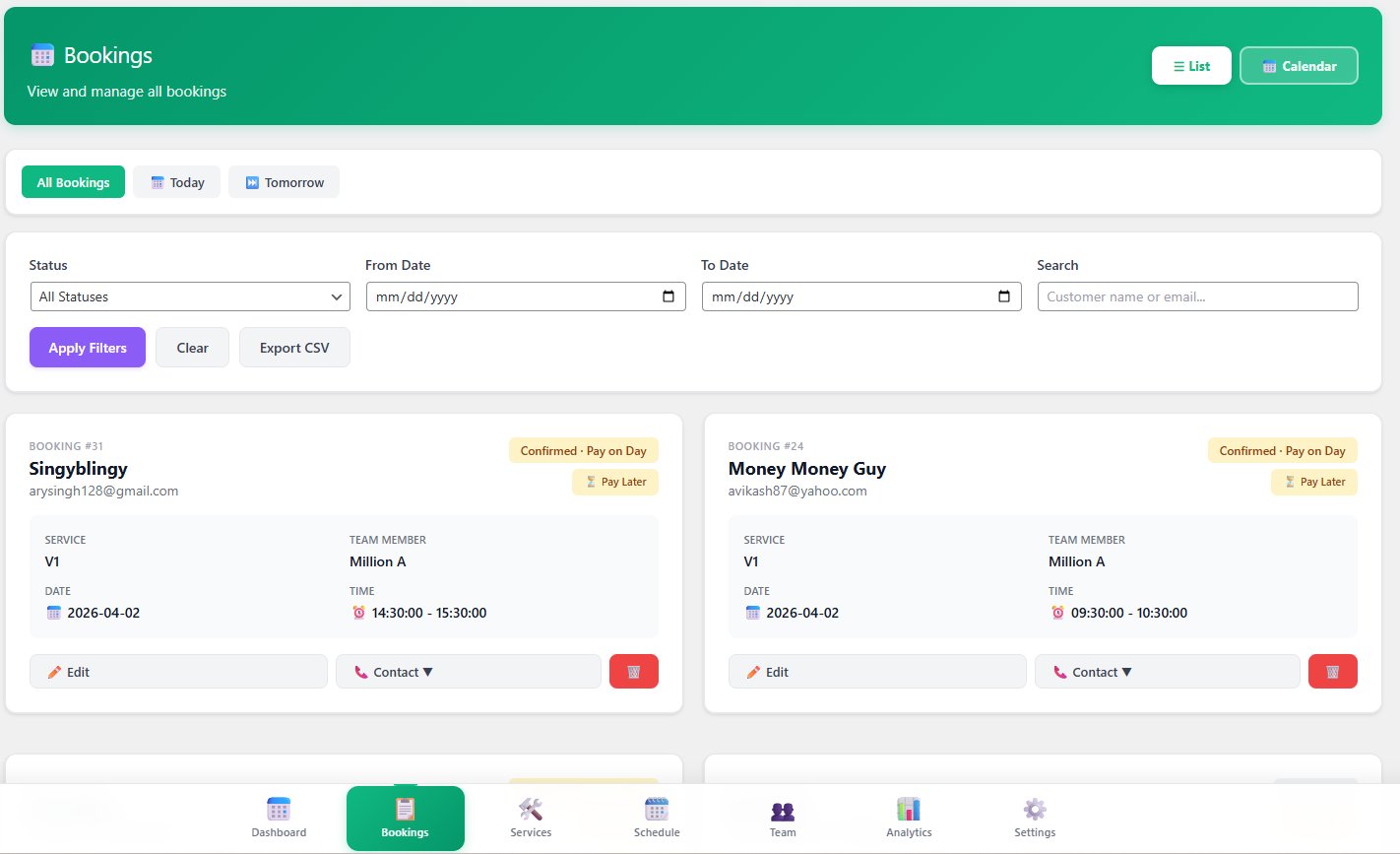
Bookings list view with filters
List View

Card-style booking list — filter, search, export

Filter by status, date range, or customer name. Card view shows service, provider, date, time, and payment status at a glance. Edit or Contact directly. Export CSV — your data is always portable.

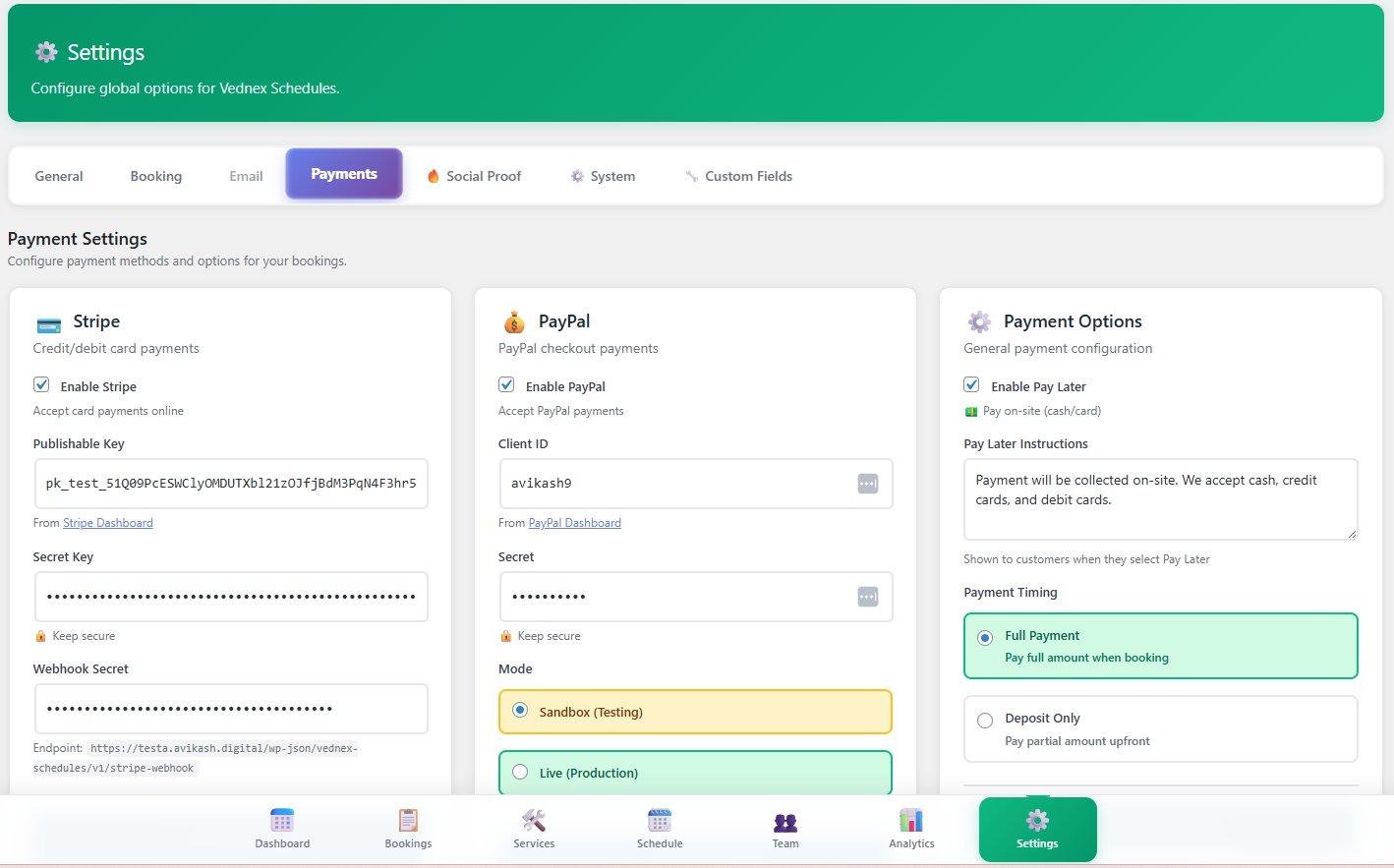
Payment settings — Stripe, PayPal, Pay Later
Payments

Stripe + PayPal + Pay Later — all in one screen

Stripe, PayPal, and offline Pay Later configured from a single settings page. Full Payment or Deposit Only mode. Switch from sandbox to live production with one click.

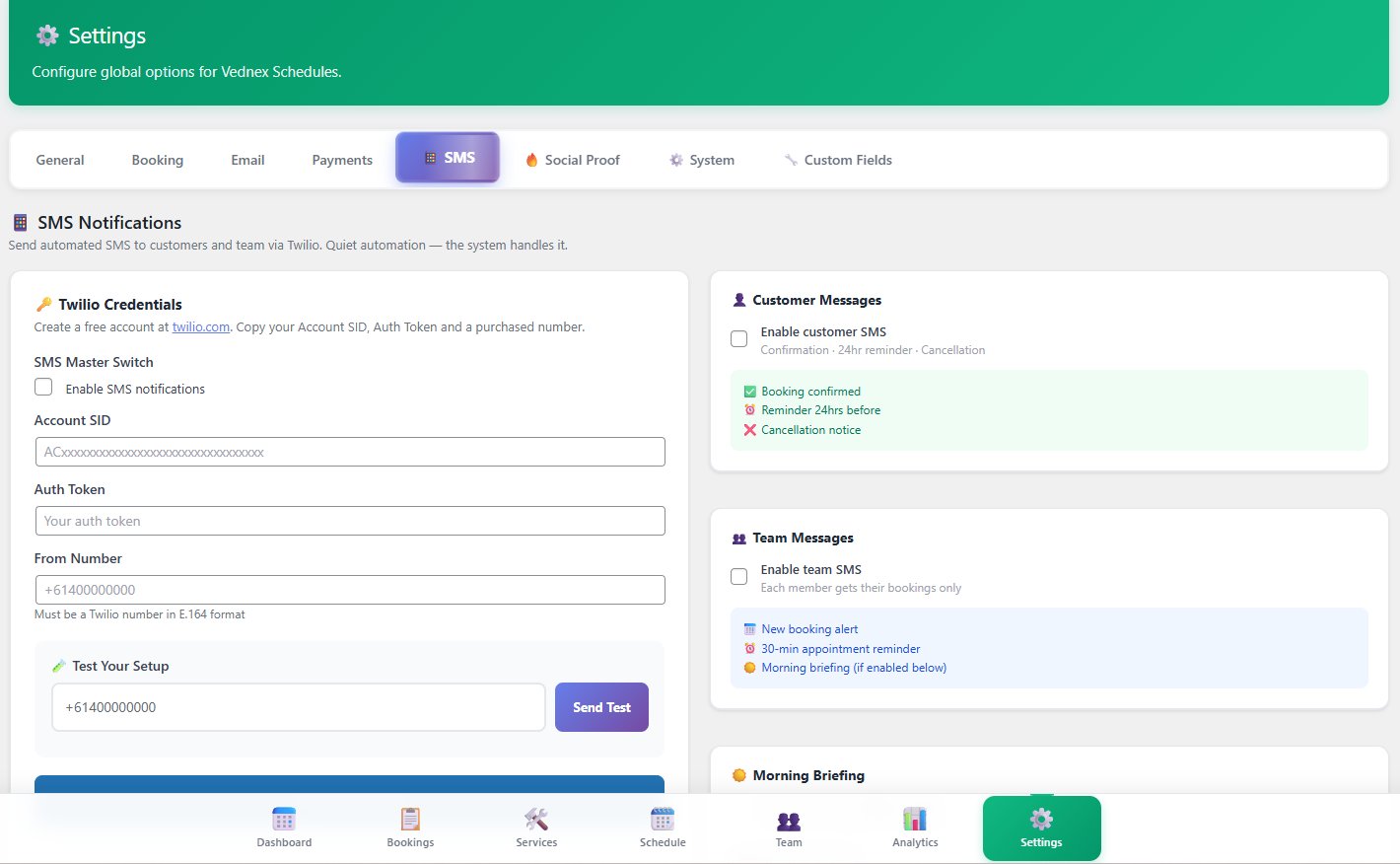
SMS settings — Twilio, customer and team messages
SMS Engine

Customer messages + team messages + morning briefing

All 9 SMS message types configurable from one screen. Customer confirmations, team alerts, morning briefing — toggle each on or off. Send a test message with one click to verify your Twilio setup.

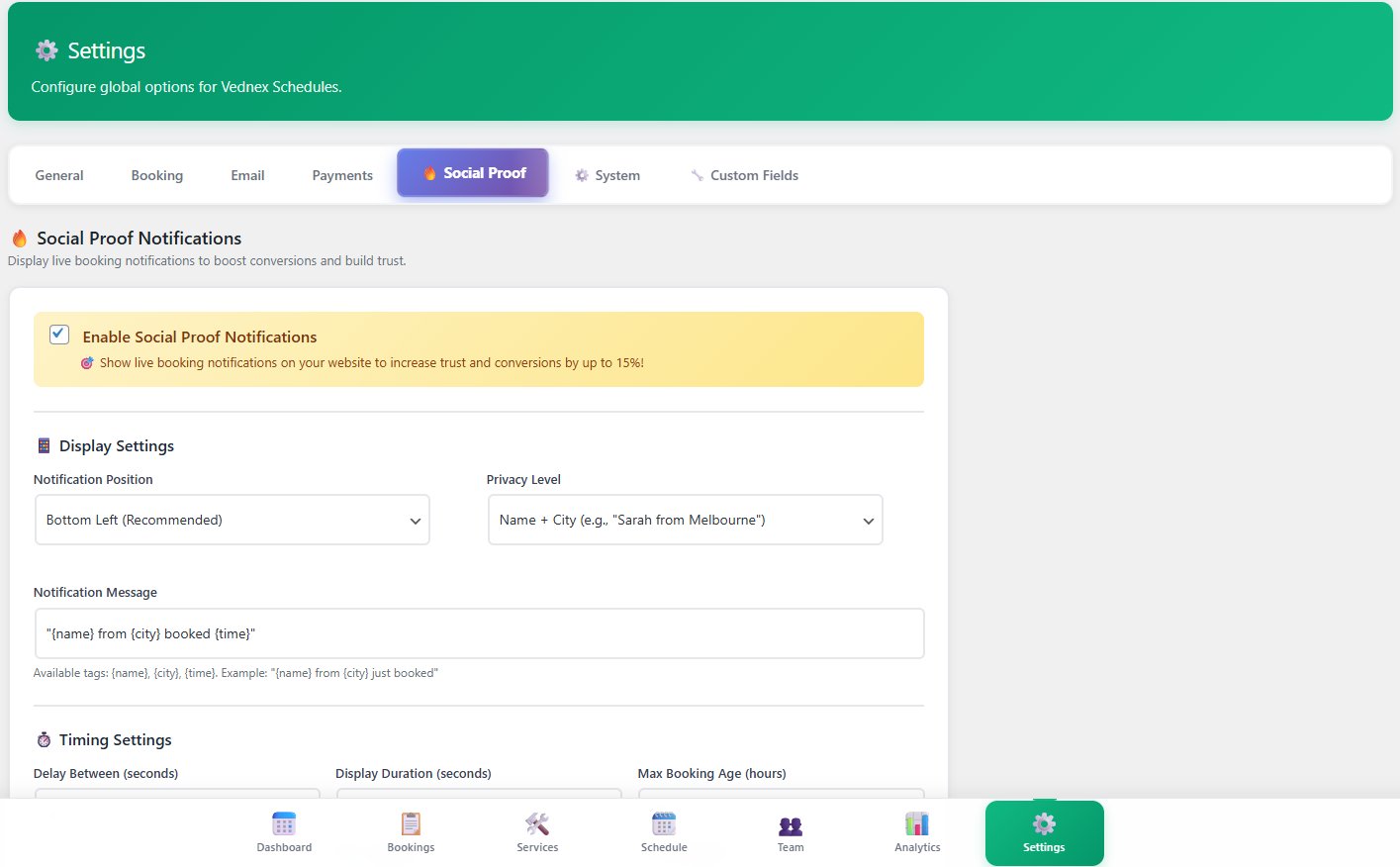
Social proof settings
Social Proof

Live booking ticker — boosts conversions by up to 15%

"{name} from {city} booked {time}" — powered by real customer data from your bookings. Set position, privacy level, timing, and message template. Toggle on and watch your booking page convert harder.

Every setting your business needs. Nothing you don't.

Eight settings tabs. Each one purpose-built. Configure once, run forever.

⚙️

General

Business name, contact info, timezone, currency, date/time format, T&C link. Your business identity, locked in.

📅

Booking

Buffer before/after appointments, slot intervals, advance booking window, minimum notice, shared or individual calendars.

✉️

Email

SMTP configuration, multiple reminder timings (24hr, 12hr, 2hr, 1hr), email signature, admin notification address.

💳

Payments

Stripe + PayPal side by side. Full Payment or Deposit Only mode. Pay Later instructions for cash/on-site businesses.

📱

SMS

Twilio credentials, customer messages, team messages, morning briefing — all configurable from one screen. Test with one click.

🔑

Licence

Paste your licence key, click Activate. Green "Licence Active" confirmation. One key per site or unlimited — based on your plan.

🔥

Social Proof

Enable the booking ticker, set position, privacy level (Name + City), message template, and timing. Boosts conversions by up to 15%.

🔧

System

Plugin version, PHP/MySQL compatibility check, database table status. Diagnostic tools for advanced operators and agencies.

Stop losing 5-star reviews to inconvenience.

Most happy customers never leave a review — not because they don't want to, but because nobody asked at the right moment. VedNex asks automatically, every time, without you lifting a finger.

01

Booking marked complete

Staff or system marks appointment done — triggers the review sequence automatically

02

Review request sent

Customer receives email + SMS with a mobile-first review form. "It only takes 30 seconds." No login needed.

03

Smart routing

4+ stars → Google Reviews link (your Google Business URL set in Booking Settings). Below 4 → private internal feedback only.

04

You stay in control

Approve, respond, or resolve negative feedback — before it ever reaches Google. Protect your public reputation automatically.

↑ Google

More 5-star reviews push you higher in local search rankings

🛡 Protected

Unhappy customers handled privately, not publicly on Google

0 Work

Fully automated from booking completion to Google submission

+15%

Social proof ticker boosts booking conversion rates on your page

What operators are saying

★★★★★
We replaced a $99/month SaaS with this. Setup took less than an hour including configuring SMS. The morning briefing alone has changed how our team starts the day.
JR
James R.Physio clinic owner, 3 locations
★★★★★
The review routing is the feature I didn't know I needed. Two unhappy customers handled privately that would have been 1-star reviews on Google. That's worth the price alone.
SM
Sophie M.Salon owner, Melbourne
★★★★★
I've deployed this for 6 clients now. The analytics dashboard impresses every single one of them. The agency license pays for itself on the first client site.
DK
David K.WordPress developer, agency owner

One price. Lifetime access. Pay once, own it forever.

No hidden fees. No per-booking charges. No "premium tier" tricks. A plugin you install, license, and own.

Single Site
$249
For individual operators and single-location businesses
  • License for 1 WordPress site
  • Full booking + payment engine
  • SMS engine (9 message types)
  • Review automation system
  • Magic link customer portal
  • Analytics dashboard
  • Morning briefing system
  • All future updates included
Get Single Site →
Unlimited Sites
$499
For developers and high-volume operators with no ceiling
  • Unlimited WordPress installs
  • Everything in Agency
  • Client sites, your own, or both
  • No per-site fees. Ever.
  • Priority support queue
  • All future updates included
Get Unlimited →

Need more? We've got you covered.

Premium add-ons for operators who want more speed, scale, or support.

Priority Support + Updates

Jump the queue. Get hands-on help from the team that built it. Includes all future feature releases first.

$79 $99/yr after launch

Multi-Location Add-On

Run multiple physical locations from one WordPress install — separate staff, calendars, and availability per location.

$129

Done-For-You Setup

We install, configure, and test VedNex Schedules on your site. Hand us the keys and come back to a running booking system.

$297
🛡

The Confidence Guarantee

Install it. Configure it. Test your entire booking flow — you have 7 full days. If VedNex Schedules isn't the best appointment infrastructure you've run on WordPress, we'll refund every dollar. No forms. No support tickets. No runaround.

Once you activate your licence, you're committed — and so are we.

Ready to end the chaos?

Choose your licence. Install the plugin.
Start taking bookings today.

Your competitors are still paying $99/month for this. You don't have to.

Get Lifetime Access — From $249 →

🔒 Secure checkout · Stripe + PayPal · 7-day guarantee · Instant delivery